Airbnb listing optimisation marketing guide
 Matthew BoyleLast updated: 23 October 2026
Tips and tricks I have used to improve leads to client's listings.
Who we are

Matthew Boyle
Matthew Boyle is a seasoned professional having helped hosts rank their Airbnb listings higher and win more bookings. He has deep Airbnb listing optimisation experience.
View Matthew Boyle's LinkedIn profileWhat it costs to hire an Airbnb listing optimisation expert
The cost of an Airbnb listing expert who provides consultancy and agency services can depend on the scope of the project and what exactly is needed. Below we have listed the prices we charge for the service. If you wish to have more information then contact us.
| What's included | One-off audit£500 | Monthly service£1,500per month |
|---|---|---|
| Listing title and description review | ✓ Included | ✓ Included |
| Photo order and quality review | ✓ Included | ✓ Included |
| Pricing comparison against local competitors | ✓ Included | ✓ Included |
| Amenities and settings checklist | ✓ Included | ✓ Included |
| Listing copy rewritten and tested | ✗ Not included | ✓ Included |
| Seasonal pricing and availability adjustments | ✗ Not included | ✓ Included |
| Review response strategy | ✗ Not included | ✓ Included |
| Monthly search ranking and bookings report | ✗ Not included | ✓ Included |
A guide to optimising your Airbnb listing for more bookings
Stay switched on into the hosting community
Airbnb regularly changes its fees, search ranking and policies, and each change can affect your bookings. The hosts who stay ahead keep themselves informed.
Get Paid For Your Pad is a long-running weekly podcast for hosts, covering pricing, listing optimisation and direct bookings. On Reddit, r/airbnb_hosts is a large, busy community where hosts share advice, warnings and what's working for them.
A few minutes a week staying in the loop could be the difference between a full calendar and empty nights.
Be patient: Rarely does success happen overnight
Ranking well on Airbnb isn’t an easy game to win. Some listings get booked straight away, but for most hosts it takes months to build momentum.
Don’t give up if your first few weeks are quiet. Stick to the strategies in this guide: write a clear title, use great photos, keep your calendar up to date, respond quickly and collect good reviews. Each booking and review helps Airbnb trust your listing a little more.
Keep checking your results and keep adjusting. The hosts who win on Airbnb are usually the ones who keep going.
Check your earnings insights regularly
Airbnb is adding AI summaries to the earnings dashboard that show how your listing is performing, what’s affecting it and what you could do about it. It’s like having a free advisor built into your account. Make a habit of checking it once a month. Look for patterns, such as weaker weekday bookings or a drop compared with last season, and consider the suggested actions. Don’t follow every suggestion blindly, though. You know your property and your guests best, so treat the insights as prompts to think, not orders.
Reviews
Good reviews are vital to a strong listing and help Airbnb's algorithms decide who to optimise.
Review the feedback you recieve and take action where the negative criticism is fair
Look, receiving negative feedback is rough even for seasoned Airbnb pros but hear me out on this tip. Especially if its public and on your profile for all to see.
However, a negative review can actually be a blessing in disguise (sometimes). But if its fair in it's complaint and if you accept the criticism, why not act on improving it? We all make mistakes, especially early on and if people are complaining about there's too much noise from other guests for example then these reviews can be a great way to collect honest feedback and improve the service. You can take actions like putting in more insulation or adding in a slow-close door mechanism in each room if its doors banging at 6am.
So use your Airbnb reviews as a feedback mechanism to improve for the better.
Hiring an expert or a consultant
Consider hiring an Airbnb optimisation expert
Airbnb works like a search engine. Where your listing appears depends on things like your photos, description, pricing and reviews. If your bookings are slow, an expert can help you stand out. You could hire a freelance consultant, an agency, a co-host or pay for one-off services like a listing review.
A good expert will rewrite your title and description, advise on professional photos and set a pricing strategy that adjusts for seasons and local events. They’ll also help you improve guest communication, which leads to better reviews and better rankings.
Be careful when hiring. Ask for real results from past clients, such as higher occupancy or nightly rates. Avoid anyone guaranteeing top spot in search, and check whether they charge a flat fee or a cut of your bookings before you sign up.
During the stay
Tips to make the stay a pleasant one for your guest.
Check in with guests to avoid bad reviews
Some guests will tell you straight away if something's wrong. That's great: if the complaint is fair, you can fix it and they'll leave happy.
Others won't. They're quieter, don't want to make a fuss, and would rather put up with a wobbly shower than mention it. But the problem doesn't go away. It shows up in their review instead, when it's too late to fix.
So keep in touch during their stay. A quick message the morning after they arrive is often all it takes:
"Hi Sarah, hope you've settled in well. Is everything OK with the place? Let me know if you need anything."
It gives shy guests an easy way to speak up, and you a chance to sort it before it becomes a review.
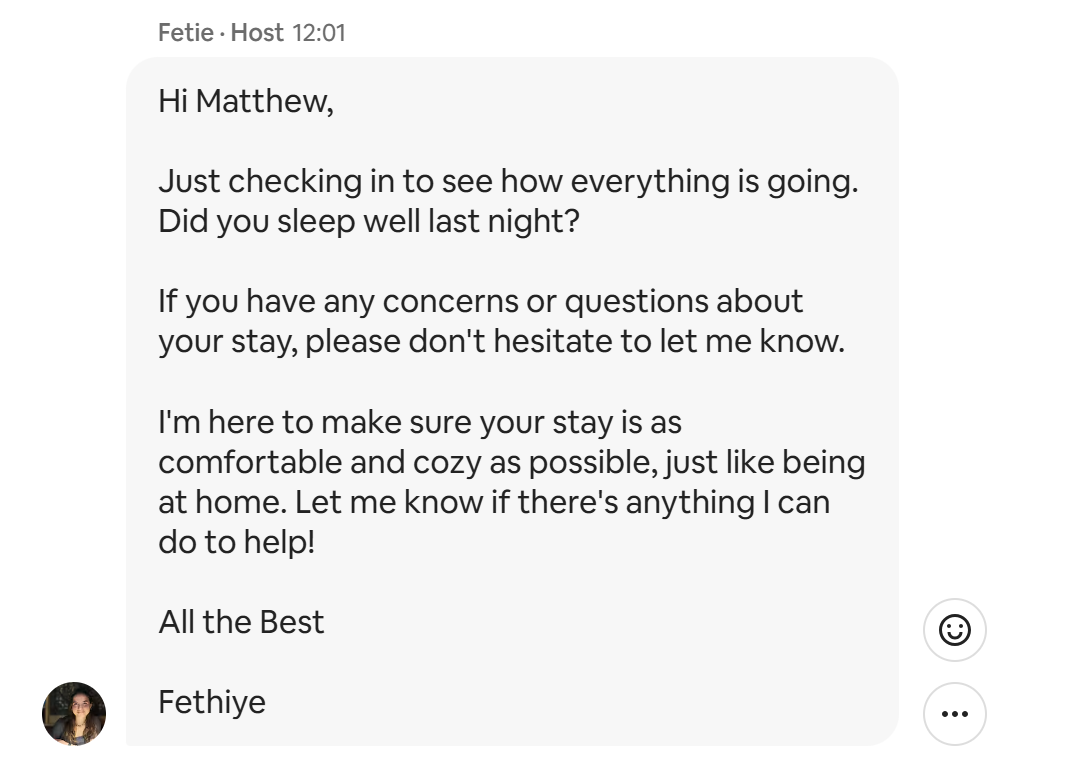
Fethiye is checking in on guests to ensure all is matching their expectations. Needless to say, I gave this host a 5* review.
Think about adding a fridge or microwave in the room.
This is a dividing one and not all hosts will agree nor will they want to do this but after a long day and the fact that some people are just naturally introverted, they may not want to go into a kitchen and engage in small talk and will just want to get their head down, get some food in them and go to bed. A fridge and a microwave can be just the right thing for those travelers that like to be alone and don't want to have to talk to people.
Chatty or quiet? Find out what your guests want
BlaBlaCar is a European ride-sharing app where you pay to hop in someone's car instead of taking the train. The trip might last 10 minutes or 10 hours, which raises an awkward question: does anyone actually want to talk?
BlaBlaCar solved it neatly. Members pick a chattiness level on their profile, from "Bla" (quiet) to "BlaBla" (happy to chat) to "BlaBlaBla" (can't stop talking). It's where the company name comes from.
Airbnb guests are no different. Some would love an evening of food, stories and board games. Others would rather hide in their room with a book.
So work out early which type you've got. A line in your welcome message does the job:
"I'm around if you fancy a chat or some local tips, but equally happy to leave you in peace. Whatever suits you!"
Then take your cue from their reply, and respect it.
Little touches like free water, tea or coffee can help lead to better reviews
Your guests may have been traveling for hours. They're tired, hungry and the last thing they want is to head straight back out to find a shop.
So stock the basics. Tea, coffee, milk and sugar should be a given. They cost you very little and save your guest a trip on their first night.
A bottle of water waiting on arrival is another easy win. For pricier or larger places, go a step further: some local biscuits, a bottle of wine, or breakfast for the first morning.
It's a small cost for you, but it's exactly the kind of thing guests remember and mention in their reviews.
Writing your listing
List and shout about the one thing that makes you stand out 📣
Airbnb now shows AI-written descriptions of each home in search results, and guests can compare homes from their wishlist side by side with AI summaries of key features. That means guests are often deciding between you and a handful of similar places at a glance. Work out the one or two things that make your listing better than its neighbours.
The perfect one would be a sea view or on the side of a mountain but if you are not lucky enough to own a property near such beauty spots then go for things such as a hot tub, free parking, a sea view or a fast Wi-Fi workspace. Then make sure they’re mentioned clearly in your title, description, photos and amenities, so the AI has no reason to miss them.
Make your description easy to scan
Most guests won't read an essay. They skim, looking for the things that matter to them, and move on if they can't find them fast.
So break your description up. Short paragraphs, clear sections, and the need-to-know details up front: how many it sleeps, the bed setup, check-in times, parking, Wi-Fi, and how far it is to the nearest station.
If a guest can find their answer in five seconds, they're far more likely to book than if they have to dig for it.
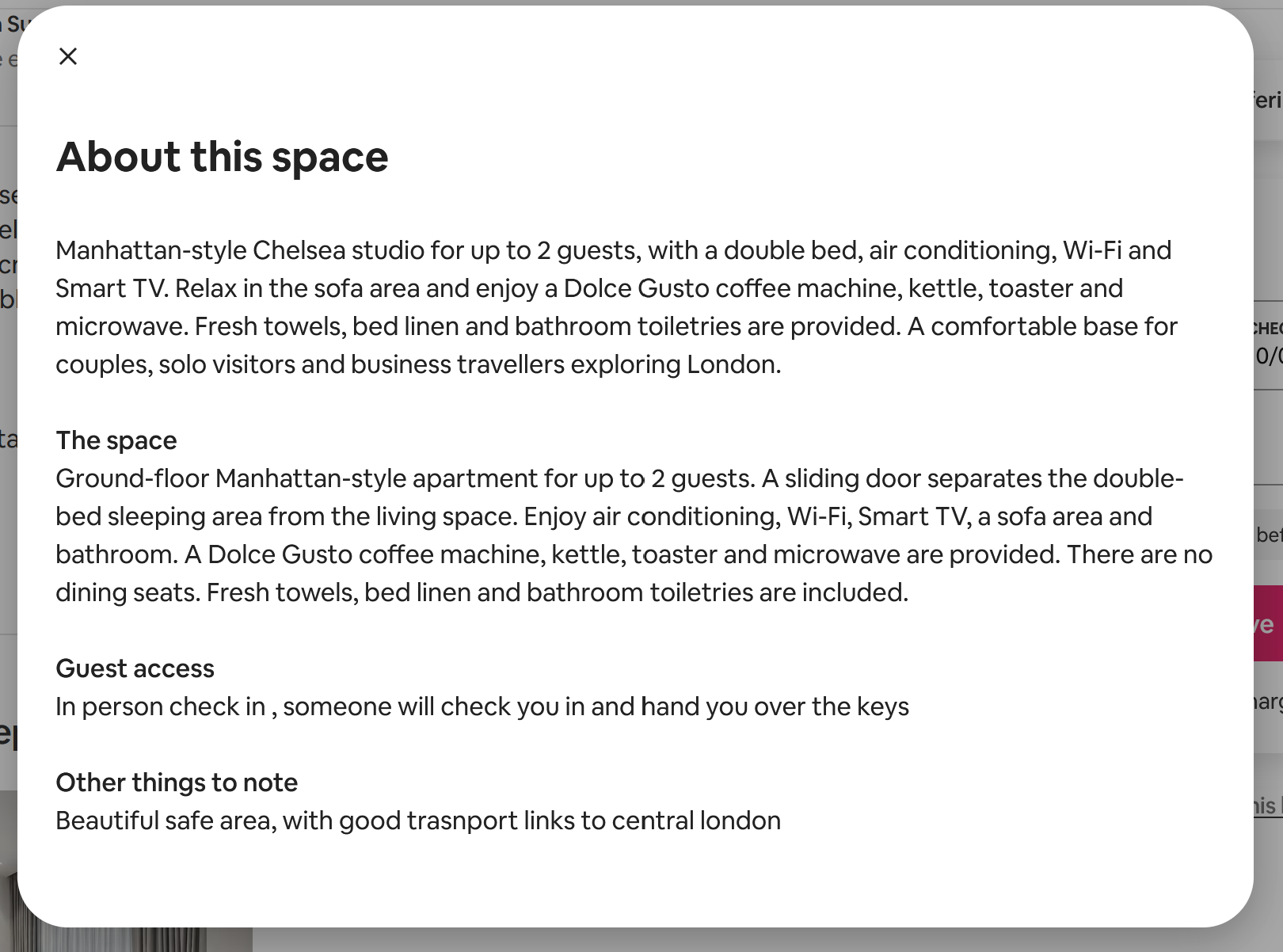
I like this description from a host. 4 easy to read paragraphs. Not walls of text. Need to know, not nice to know information.
Be upfront about the things you can't change
Every property has its quirks. Some you can fix. Others, like location, you're stuck with. Either way, don't let them be a nasty surprise.
I once stayed in a flat on a very busy road in Brixton. It was loud, and loud all night: sirens, traffic, and crowds spilling out of the pubs at closing time.
But the listing warned me about the noise, and there were earplugs waiting by the bed. I used them. And I didn't hold the noise against the host, because I knew what I was booking.
That's the point. Guests who know about a problem in advance are far less likely to complain about it in a review. Be honest in your listing, and where you can, offer a simple fix.
Switch on Instant Book and self check-in for an algorithmic boost
Guests love convenience, and Airbnb knows it. Both Instant Book and self check-in show up as search filters, so switching them on means you appear in more searches, and they can help your ranking too.
There's a trade-off with each. Instant Book means guests can book without asking you first, though you can still set some requirements for who can book. Self check-in means putting in a lockbox or smart lock and writing clear, foolproof arrival instructions.
It's a bit more setup at your end, but if you're serious about getting your listing seen, both are well worth it.
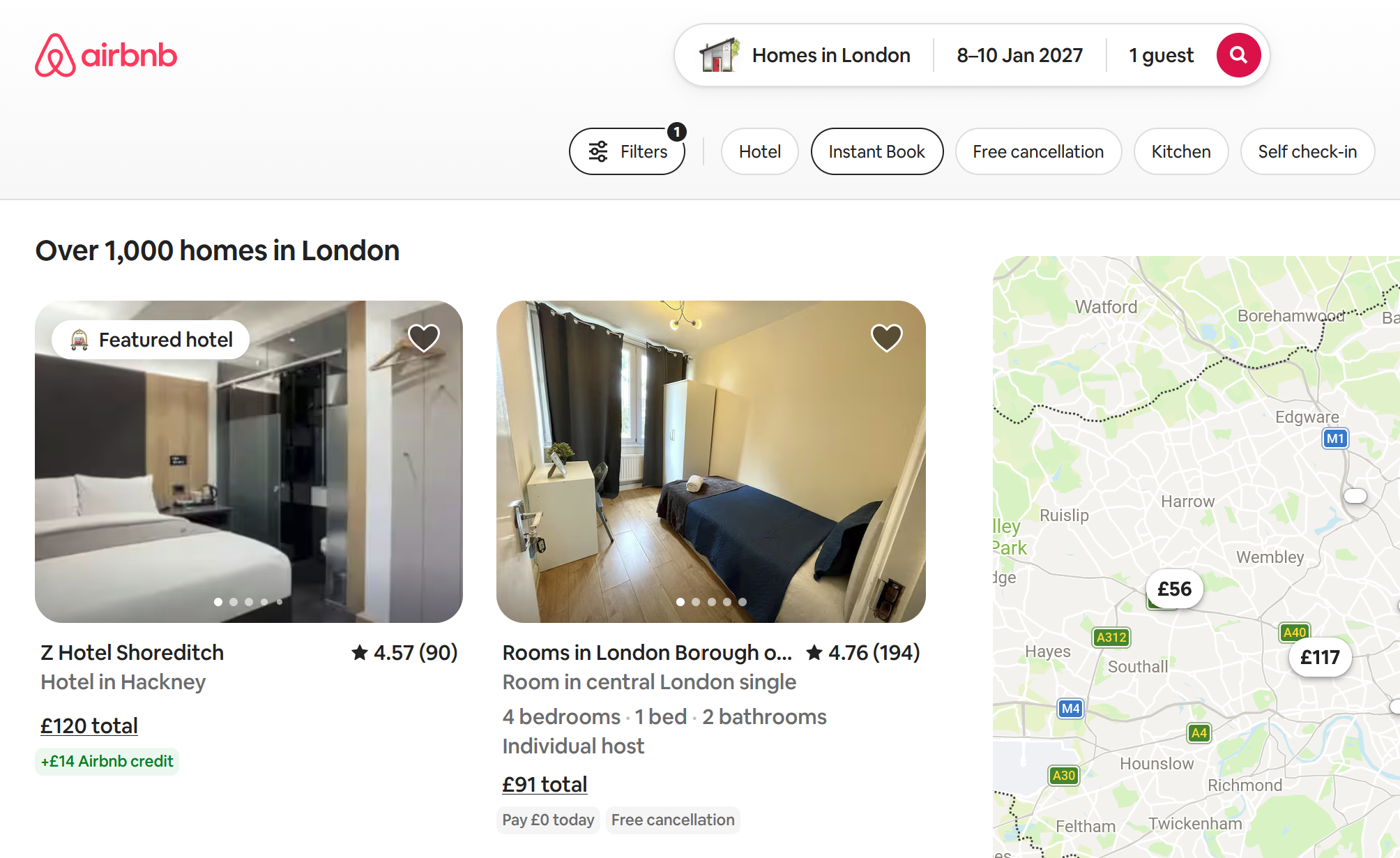
Instant book is a powerful tool for travellers that want to book instantly. You are likely to be favoured by the algorithms and appear more.
Test your Airbnb title and cover photo to get more clicks
Testing two versions to see which wins is an old marketing trick, and it works on Airbnb too.
Your title and cover photo are what guests see in search, so they decide whether anyone clicks. Try two titles, for example:
"Cosy 2-bed flat near Clapham Common" vs "Sunny 2-bed with garden, 5 mins to the Tube"
Airbnb has no built-in split test, so run each version for two to four weeks, one after the other. Change one thing at a time, or you won't know what made the difference.
Then check the Insights tab in your host dashboard. The number to watch is search-to-listing conversion: how often people who see you in search click through.
Compare similar periods, as seasonal demand can skew results. Once you've found a winning title, repeat the process with your cover photo.
Add a 3D floor plan when you can
One of the most common guest frustrations is arriving to find the layout isn’t what they expected, such as a second bedroom that’s really a box room or a bathroom only reachable through a bedroom. Airbnb is rolling out interactive 3D floor plans so guests can understand a home’s layout before they book. When the option reaches your account, use it. Setting the right expectations means fewer surprises, fewer complaints and better reviews. It’s especially worth doing if your property has an unusual layout, several floors or rooms that photos don’t explain well.
Try dynamic pricing, with limits you set 💸
Setting nightly prices by hand is time-consuming, and it’s easy to charge too little on busy weekends or too much on quiet ones. Airbnb’s new dynamic pricing recommends a price range, and with one tap your prices then adjust automatically based on daily demand and supply. You stay in control: you can change the range at any time and adjust individual nights in your calendar. If you try it, set a minimum price you’re happy with, then check your calendar every week or two to make sure the prices make sense for your property.
Your profile
Ways to imrpove your profile to really stand out.
Improve your response rate and time
Should be a no brainer but this is clearly displayed on your profile. If you are not responding to 100% of messages or take longer than a few hours to respond this won't help your listings.
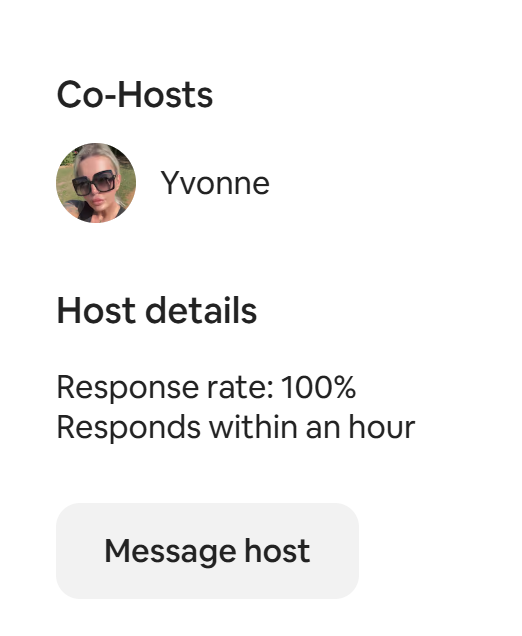
Yvonne, a cohost has a fantastic response time of replying to messages within an hour and a 100% track record. Great work Yvonne.
Show off your flair, pimp your profile!
Go crazy with your profile and show off the real you. Airbnb was built all around the community.
Your profile picture matters more than you think
Guests are staying somewhere they've never been, with someone they've never met. Reviews help build trust, but so does how you present yourself, and that first impression now happens online.
So first, make sure you actually have a profile picture. Second, make it a friendly one: a clear, well-lit photo of your face, not a group shot, a logo or your holiday snaps.
And smile. It's one of the few gestures recognised almost everywhere, so wherever your guests are travelling from, it tells them they're in good hands.
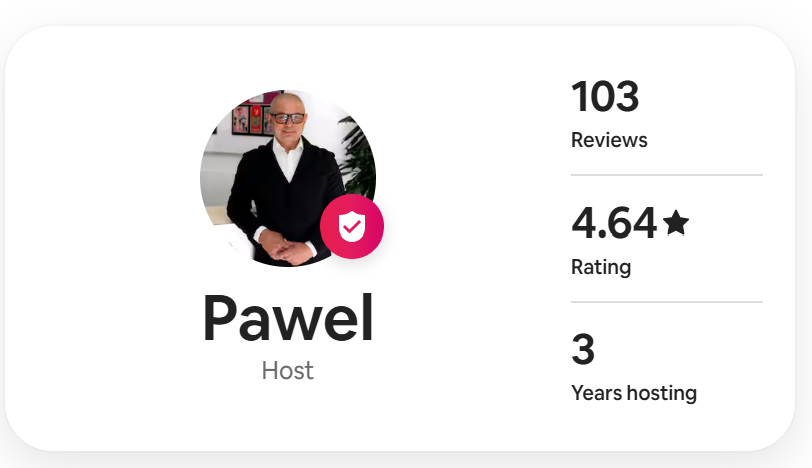
Pawel has taken his profile picture seriously and has had a proper photo taken showing professionalism and friendliness.
Frequently asked questions about Airbnb listing optimisation
Do you charge for Airbnb listing optimisation on a fixed-project, hourly or monthly retainer basis?
I don't charge by the hour. My Airbnb listing optimisation services come in two fixed-price options: a one-off audit for £500, or a monthly retainer at £1,500 per month.
The audit is a fixed project with a clear end result, so you know the full cost up front. The retainer is a monthly fee for ongoing, hands-on work. If you're not sure which suits you, get in touch and I'll recommend one.
How much time and resources will you need from our team during the research phase?
Very little. Before I start, I'll send you a briefing form with questions about your property, your listing, your pricing and the guests you want to attract. Once you've filled that in, I'll take care of the research and only come back to you if I need access to something or have a question.
How long will it take to see results from Airbnb listing optimisation?
How long is a piece of string? It depends on the campaign, and it can take anywhere from a few days to several months. Some changes, such as a new title, better photo order or a pricing tweak, can make a difference within days. Others, such as building up reviews and ranking consistently across the seasons, take months.
Once I've reviewed your listing and local competition, I'll give you a realistic timeline for your situation.
What's the difference between the Airbnb listing optimisation audit and the monthly retainer?
With the audit, I'll present you with an audit document full of recommendations, which you or your team can then put into action.
The audit covers:
- Listing title and description review
- Photo order and quality review
- Pricing comparison against local competitors
- Amenities and settings checklist
With the retainer, I'm hands-on. I'll help with the day-to-day management of your Airbnb listing optimisation and we'll have regular check-ins to review progress.
On top of everything in the audit, the retainer includes:
- Listing copy rewritten and tested
- Seasonal pricing and availability adjustments
- Review response strategy
- Monthly search ranking and bookings report
Matthew Boyle
Digital Marketing Consultant · ~20 years experience
Matthew Boyle has over 20 years experience in digital marketing covering a wide range of topic areas. He is available for a one-off consultation or ongoing support.
View my LinkedIn profile