Ecommerce SEO
 Matthew BoyleLast updated: 23 October 2026
Tips and tricks around Ecommerce SEO
Who we are

Matthew Boyle
Matthew Boyle is a seasoned professional having helped online stores grow their organic traffic and revenue. He has deep ecommerce SEO experience.
View Matthew Boyle's LinkedIn profileHow much ecommerce SEO expert and agency services cost
The cost of an Ecommerce SEO expert who provides consultancy and agency services can depend on the scope of the project and what exactly is needed. Below we have listed the prices we charge for the service. If you wish to have more information then contact us.
| What's included | One-off audit£500 | Monthly service£1,500per month |
|---|---|---|
| Category and product page audit | ✓ Included | ✓ Included |
| Site structure and faceted navigation review | ✓ Included | ✓ Included |
| Product schema and rich results check | ✓ Included | ✓ Included |
| Keyword gap analysis vs competitors | ✓ Included | ✓ Included |
| Category and product copy written | ✗ Not included | ✓ Included |
| Internal linking improvements | ✗ Not included | ✓ Included |
| Out-of-stock and seasonal page handling | ✗ Not included | ✓ Included |
| Monthly organic revenue report | ✗ Not included | ✓ Included |
A guide to ecommerce SEO that drives more sales
Turn popular filters into proper pages
Your shop's filters, like colour, size or brand, could be bringing in customers from Google. Some filters match things people actually search for, such as "black lanyards" or "Nike trainers". Those deserve their own proper page, with a clear title, heading and a short paragraph of helpful copy. Other filters, such as "in stock", "on sale" or "sort by price", are just there to help shoppers narrow things down. Nobody searches for them, so they shouldn't become pages that Google can find.
Only create pages that pass three tests
Before turning a filter or product group into its own page, check three things. First, demand: are people actually searching for it? Use a keyword tool or Google Search Console to check. Second, depth: do you have enough products to fill the page? Aim for at least six, because a page with two products looks thin. Third, intent: search the term on Google and see what comes up. If it's mostly category pages, a category page makes sense. If not, and its full of news sites, reddit threads or unrelated searches, it may not be worth creating and Google and other AIs and search engines may consider it spam.
Keep product details the same everywhere
Your product information now appears in lots of places: your website, Google Shopping, marketplaces like Amazon, and AI shopping answers. If those places disagree, for example your website shows a product in stock but your Google Shopping feed says it's sold out, Google can stop showing your products altogether. Pick a handful of your best sellers and check them across every channel: price, stock, sizes, colours and pack size. Fix anything that doesn't match, and get into the habit of updating everywhere at once.
AIs are fantastic at collating data and if they know that something is a mismatch, then it's an instant red flag.
Add real-life details to product pages
Shoppers now search with real situations in mind, like "dry shampoo alternative for curly hair I can use after the gym". Your product pages can answer those searches with simple sections such as "Perfect for", "When to use", "Do not use with" or "What customers say". A plant shop might add "Perfect for north-facing rooms" or "Plant now for flowers in spring". These small details help customers decide, and they help Google and AI tools match your products to the very specific questions people ask.
Speak to every type of shopper
The same product can be bought by very different people for very different reasons. A watch might be bought as a 30th birthday gift, as someone's first proper watch, or by a style-lover hunting a 70s look. Yet most product pages only speak to one of them. Think about who buys your product and why, using your reviews, customer questions and Reddit discussions. Then say clearly on the page who your product is for, and who it isn't for. AI tools love this, because it matches longer, more personal searches. Struggling to define your customer base, try a pro tip and ask AI who would or wouldn't buy this if you don't actually know.
Don't delete out-of-stock products
When a product sells out, it's tempting to delete the page or hide it from your menus. Don't. That page may have built up Google rankings that disappear when it goes. If the product is coming back, keep the page live, keep it linked from its category, mark it clearly as out of stock and offer a "notify me" option or alternatives. Only remove a page if the product is gone for good, and even then, redirect it to the closest alternative or its category page.
Write product titles that say what it is including the keyword variations that people use to search
Your product titles in Google Shopping, and increasingly in AI shopping answers, need to tell shoppers and machines exactly what the product is. A simple formula works well: brand, product name, product type, then key details like colour, size or material. For example, "Nike Air Force 1 Women's Trainers, White, Size 4.5". Put the most important words in the first 70 characters, because longer titles get cut off. A clear, detailed title helps your product match the specific searches people make. It might be a nightmare for your editorial team that would pretty editorial titles but searches are often relevant and to the point.
This helps crawlers and AI's see answers quickly without having to crawl and synthesise the whole guide.
If you go onto Amazon now, you will see this in action big time.
Don't hide key product details behind JavaScript
Many websites load important details, like prices, size guides and product information, using JavaScript after the page opens. People see them fine, but AI tools like ChatGPT often can't run JavaScript, so they never see that content. That means AI may describe your products without your size guide, or skip them because the price is missing. Ask your developer or website platform whether key content is in the page from the start. A quick check: right-click your page, choose "View page source" and search for your price.
Often things like this need you to speak to your tech team to get these things fixed.
Leave no product question unanswered: Fill out your product pages with as much information as possible
When shoppers ask AI tools detailed questions, such as “waterproof walking boots with wide fit for winter hikes under £100”, the AI looks for products with the details to match. If your product page doesn’t mention the fit, the material or whether it’s waterproof, the AI can’t recommend you, even if your product is perfect. So list as much information as you can: sizes, dimensions, materials, weight, care instructions, compatibility, what’s in the box and who it’s for. Add answers to common customer questions too. The more complete your product information, the more questions you can answer, and the more likely AI is to mention you.
Write guides that show how your products are used
AI tools don’t only look at product pages when deciding what to recommend. They also read helpful guides that explain which products suit which people. If you sell running shoes, a guide on the best running shoes for women, or a real story of a customer training for their first marathon in your shoes, gives AI useful context it can draw on. It helps the AI understand who your products are for and when they’re the right choice. Think about the questions your customers ask before buying, then write a guide that answers each one, featuring your products naturally.
Test whether better photos win more shoppers by analysing multimodal search console data
More shoppers now search with a photo instead of words. They snap a jacket they like or screenshot an outfit, and Google shows them similar products. Google Search Console now shows how your pages perform in these searches. In the Performance report, open “Search type”, choose Web, then “Multimodal”.
Use it as a scoreboard for your product photos. Pick a few products that get little photo-search traffic and upgrade their images: clear, original shots from several angles, a plain background and descriptive file names. Leave similar products unchanged. After a month, compare the two groups. If the upgraded products get more impressions and clicks, roll the same approach out across your shop.
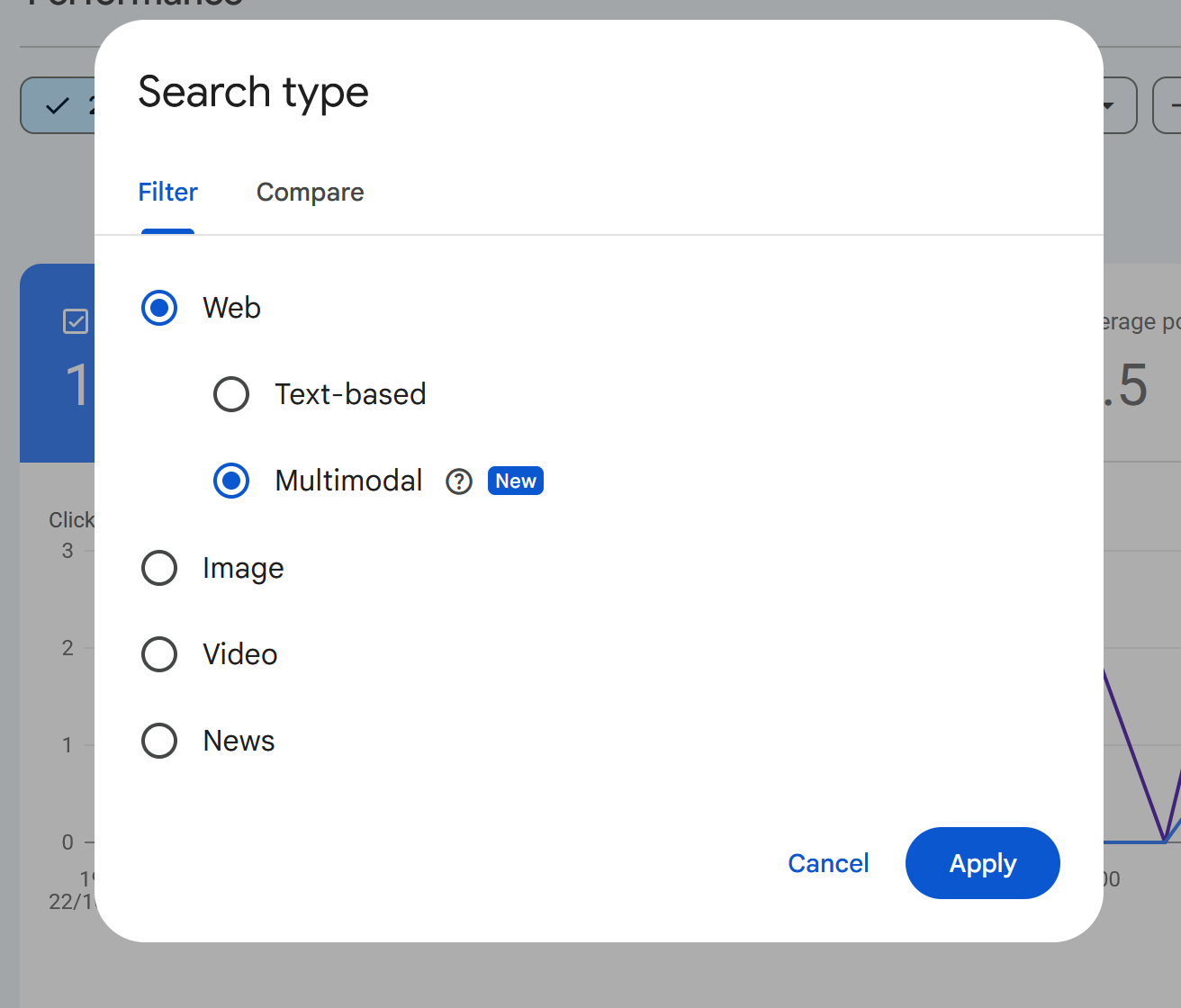
See which of your product pages are being found by users uploading media.
Google Shopping
Tips and tricks around Google's own shopping platform.
Get into Google Shopping to reach AI shoppers
If you sell products online, make sure they appear in Google Shopping. ChatGPT has been pulling product information from Google Shopping to recommend products, and Google's own AI answers rely on it too. You don't need to pay for ads to start. Set up a free Google Merchant Center account, connect your shop and your products can appear in free listings. Shopify, WooCommerce and other platforms make this fairly simple. Get your products right in Google Shopping, and you're also preparing them for AI shopping.
Fill in the optional details in your Google Shopping product feed
Google Shopping only requires a handful of details for each product, such as title, price, link and image, and most shops stop there. But most of the available fields are optional, and those are the ones AI uses to understand and recommend products. Fill in extras like product highlights, product details, material, colour and common questions with answers. One agency tested this and saw around 40% more product recommendations in ChatGPT. The basics get you listed. The extras get you recommended.
Agentic e-commerce
With an internet becoming increasingly agentic, these tips are designed to help agents navigate and purchase from your stores.
Make your shop easy for AI agents to buy from
Soon, many shoppers won’t visit your website at all. They’ll tell an AI assistant something like “order me a black lanyard pack under £20, delivered by Friday”, and an AI agent will find a product, compare options and complete the purchase for them. The customer never sees your site, but the agent does. So make it easy for one to shop with you. Show prices, stock, delivery costs and times, sizes and your returns policy clearly on every product page. Offer guest checkout, keep forms short and avoid unnecessary pop-ups. If your shop platform, such as Shopify, offers ways to sell directly inside AI tools, switch them on.
Frequently asked questions about ecommerce SEO
Do you charge for ecommerce SEO on a fixed-project, hourly or monthly retainer basis?
I don't charge by the hour. My ecommerce SEO services come in two fixed-price options: a one-off audit for £500, or a monthly retainer at £1,500 per month.
The audit is a fixed project with a clear end result, so you know the full cost up front. The retainer is a monthly fee for ongoing, hands-on work. If you're not sure which suits you, get in touch and I'll recommend one.
How much time and resources will you need from our team during the research phase?
Very little. Before I start, I'll send you a briefing form with questions about your store, the platform it runs on, your key product categories and your main competitors. Once you've filled that in, I'll take care of the research and only come back to you if I need access to something or have a question.
How long will it take to see results from ecommerce SEO?
How long is a piece of string? It depends on the campaign, and it can take anywhere from a few days to several months. Some changes, such as fixing indexing issues or improving key category pages, can make a difference within days. Others, such as growing organic revenue across your whole catalogue, take months.
Once I've reviewed your store, I'll give you a realistic timeline for your situation.
What's the difference between the ecommerce SEO audit and the monthly retainer?
With the audit, I'll present you with an audit document full of recommendations, which you or your team can then put into action.
The audit covers:
- Category and product page audit
- Site structure and faceted navigation review
- Product schema and rich results check
- Keyword gap analysis vs competitors
With the retainer, I'm hands-on. I'll help with the day-to-day management of your ecommerce SEO and we'll have regular check-ins to review progress.
On top of everything in the audit, the retainer includes:
- Category and product copy written
- Internal linking improvements
- Out-of-stock and seasonal page handling
- Monthly organic revenue report
Matthew Boyle
Digital Marketing Consultant · ~20 years experience
Matthew Boyle has over 20 years experience in digital marketing covering a wide range of topic areas. He is available for a one-off consultation or ongoing support.
View my LinkedIn profile