Google Maps marketing guide
 Matthew BoyleLast updated: 23 October 2026
Hints, tips and tricks to optimising your business on Google Maps.
Who we are

Matthew Boyle
Matthew Boyle is a seasoned professional having helped multiple local businesses gain new leads and business. He has deep Google Maps marketing experience.
View Matthew Boyle's LinkedIn profileWhat a Google Maps marketing expert or agency costs
The cost of a Google Maps marketing expert who provides consultancy and agency services can depend on the scope of the project and what exactly is needed. Below we have listed the prices we charge for the service. If you wish to have more information then contact us.
| What's included | One-off audit£500 | Monthly service£1,500per month |
|---|---|---|
| Google Business Profile audit | ✓ Included | ✓ Included |
| Map pack ranking check for your key searches | ✓ Included | ✓ Included |
| Competitor profile comparison | ✓ Included | ✓ Included |
| Category, services and attributes review | ✓ Included | ✓ Included |
| Weekly Google Posts written and published | ✗ Not included | ✓ Included |
| Photo uploads and profile updates | ✗ Not included | ✓ Included |
| Review request strategy and replies | ✗ Not included | ✓ Included |
| Monthly local ranking grid report | ✗ Not included | ✓ Included |
The complete guide to Google Maps marketing
Be extremely mindful that this won't be an overnight success. It takes dedication and time.
People often think that they buy a service, ask for the help of an expert or work on something that results will come overnight. In the vast majority of cases, this is just not true and the same applies for your Google Maps marketing strategy.
You are building up a long term growth strategy here and after a while, the results should start snowballing.
The key attributes to a optimised profile are strong positive reviews about your brand, a well kept up-to-date listing where factual information is correct and plenty of polished photos and videos of your business where people can see what to expect.
Hire a Google Maps marketing consultant or expert
If you'd rather have someone handle this for you, Matthew Boyle has worked on local SEO with a range of small business owners and can advise on growing leads, traffic, and sales through your Google Maps presence. Get in touch to find out how he can help.
Filling out your listing
A comprehensive listing is correlates with your Google Maps performace. Try to make it as detailed and helpful as possible.
Upload photos — lots of them
You don't need a professional photographer. In-the-moment shots work fine. If you're a tradesperson, show yourself and the team on the job. It proves you're a real, active business — and Google surfaces photos prominently in local listings. We've all arrived somewhere that "said it was open" and found a locked door.
Remember that Google Maps accepts user generated content (UGC) which means anyone can upload anything. People could therefore add blurry photos or irrelevent photos of your business that you don't want showing that don't truly represent the quality of your brand. By uploading your own photos, you help to control the narrative of what you want perspective customers to see.
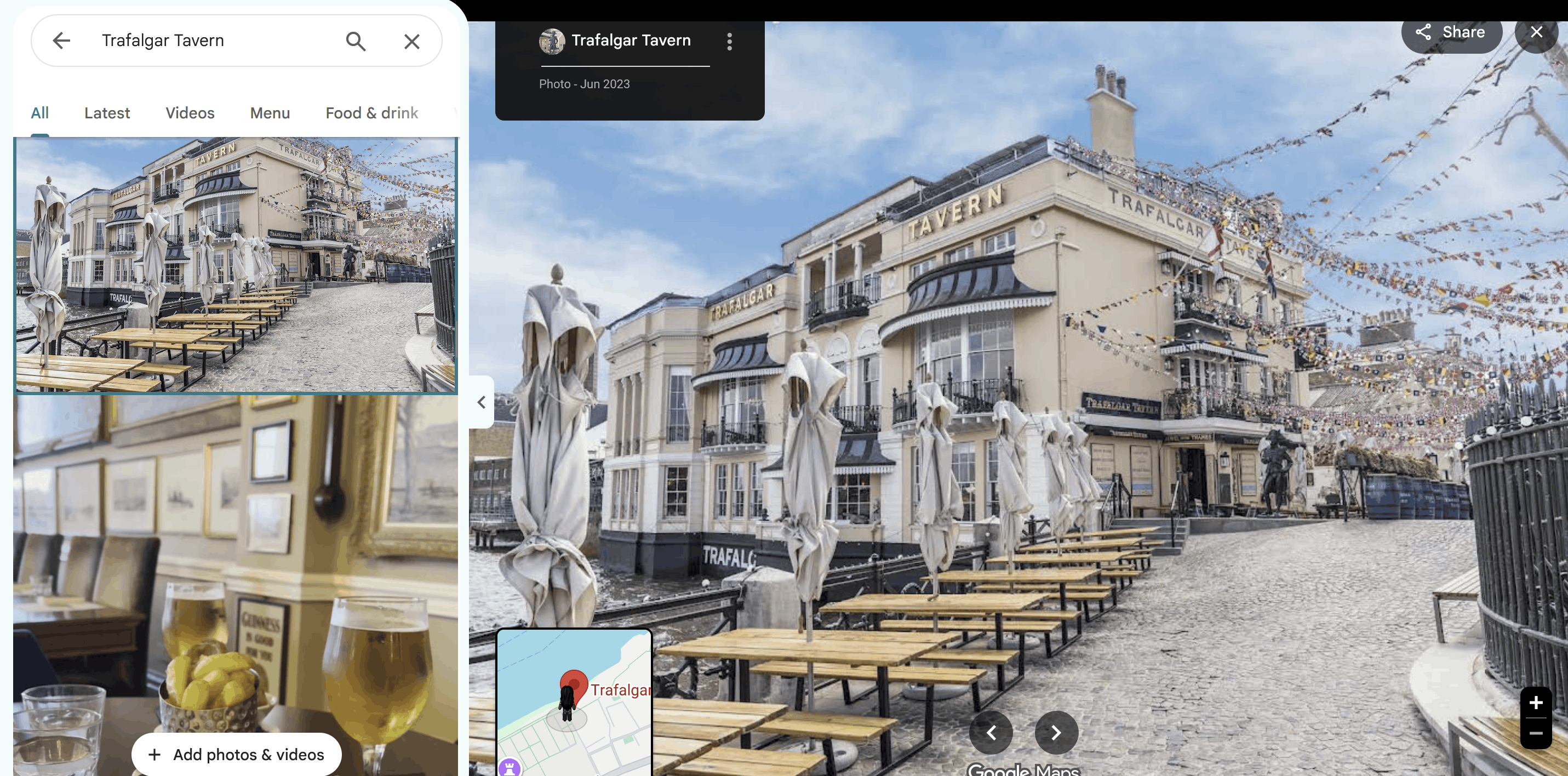
The Trafagar Tavern, a popular pub in Greenwich, London has had professional photos taken of their pub and food and have uploaded them to it's profile. This is preferred to random images uploaded by users that are often blurry or don't make any sense.
Keep your listing accurate and check it regularly
Set a reminder. Log in, review the details, update anything that's changed. Google rewards active listings. There are also user feedback mechanisms that let people flag incorrect info — you don't want to be caught out by those.
Add a WhatsApp number to your listing
A phone number is a given, people want to call. But younger customers would rather text than speak. Whether it's reserving a table, booking a slot, or a quick question before committing, WhatsApp is often the fastest way to make that happen. An email or contact form on your website is fine but nothing beats the speed of a WhatsApp message for them and for you.
List every service you offer as these show up on the services section of the Google Maps profile
Fill out the services tab on your Google Business Profile fully, including the smaller or less obvious ones you might not think to mention. People search Google Maps and Google itself for specific services, not just business types — someone searching "boiler repair" rather than "plumber" should still find you. The more complete your service list, the more searches you can appear in, and the more people see your listing in the first place.
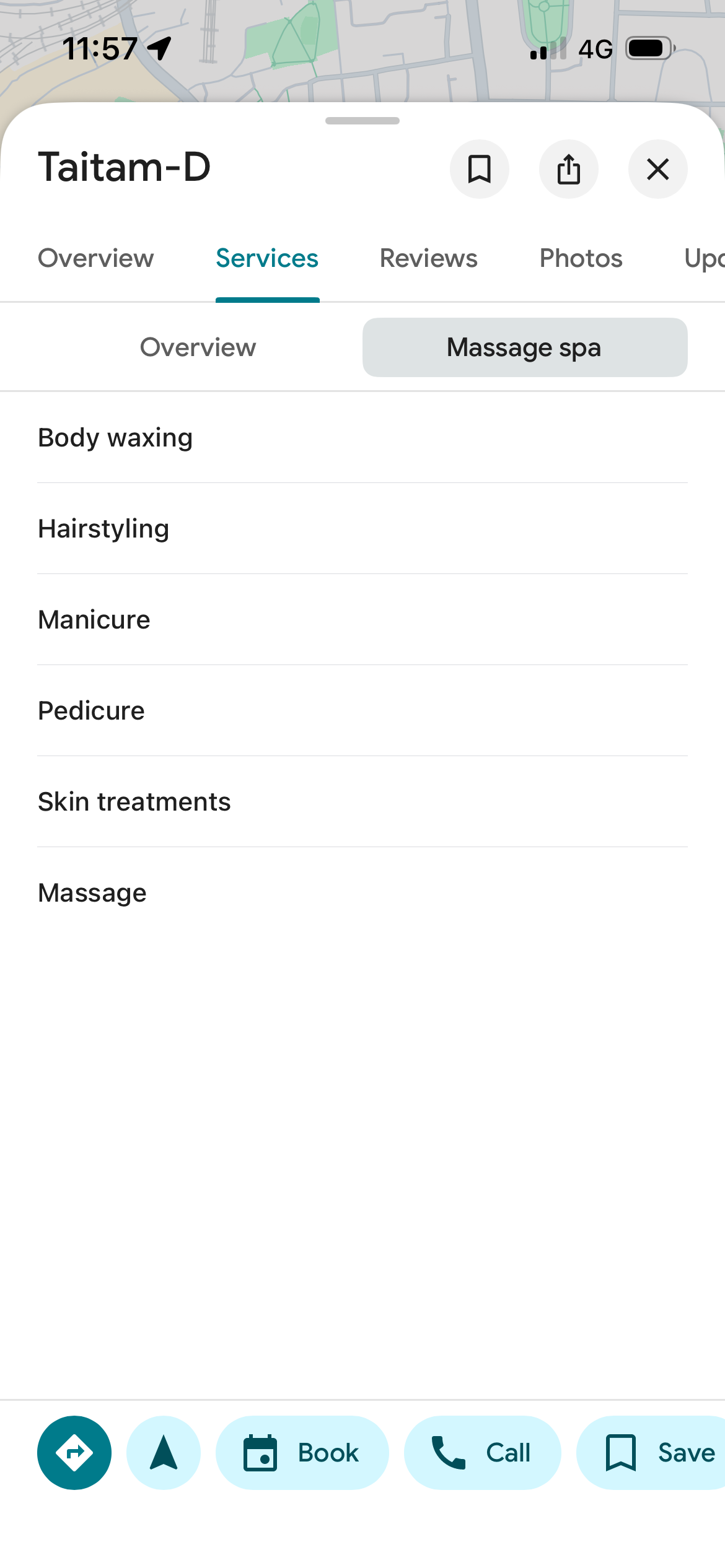
Try to list as many sevrices as possible in this section. Google will use this section for people making searches on Google Maps andd Google itself and will list you if the specific service you offer is listed here.
Try to win real estate in the discover mode off Google Maps through a strong business listing.
The carosels show a range of options depending on the location and time of day. Cafes during the early hours, places for lunch during morning hours and restaurants for dinner during afternoon and evening hours, hotels to stay in tourist areas and sights to see. This is prime real estate in the app that you can win with a high quality Google Maps listing. It's a discoverability mode which your potential customers are browsing
To get listed here, you need a strong listing. This means good quality photos, good reviews and being regularly updating your profile.
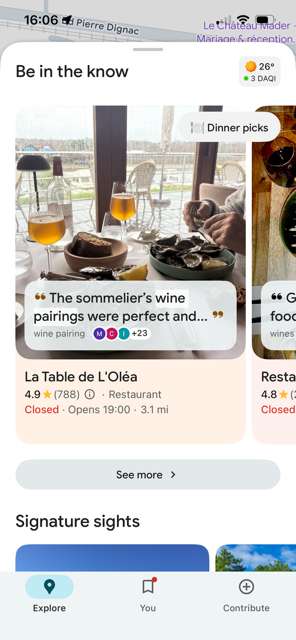
A strong profile including regularly updating your profile, strong reviews and a good range of photos will help you capture real estate in this section of the app.
List your prices on Google Maps. It should lead to faster conversions rather than users getting lost on your website.
When someone finds your business on Google Maps, they want to know two things before they click: location and price. Show them both, and you convert faster. If you hide the price of your products or services and they click to your website there is a chance that you could end up losing them in the journey for a variety of reasons.
Google Maps now displays pricing directly in the booking options section.
Price transparency kills friction. A potential customer sees your service, sees the cost, and makes a decision in seconds. No website click needed. No "let me check their site first" moment. They're ready to book or call. Bike rental, plumbing, salons, personal training, any local business can benefit from this. The customer is in buying mode. Showing your price keeps them there.
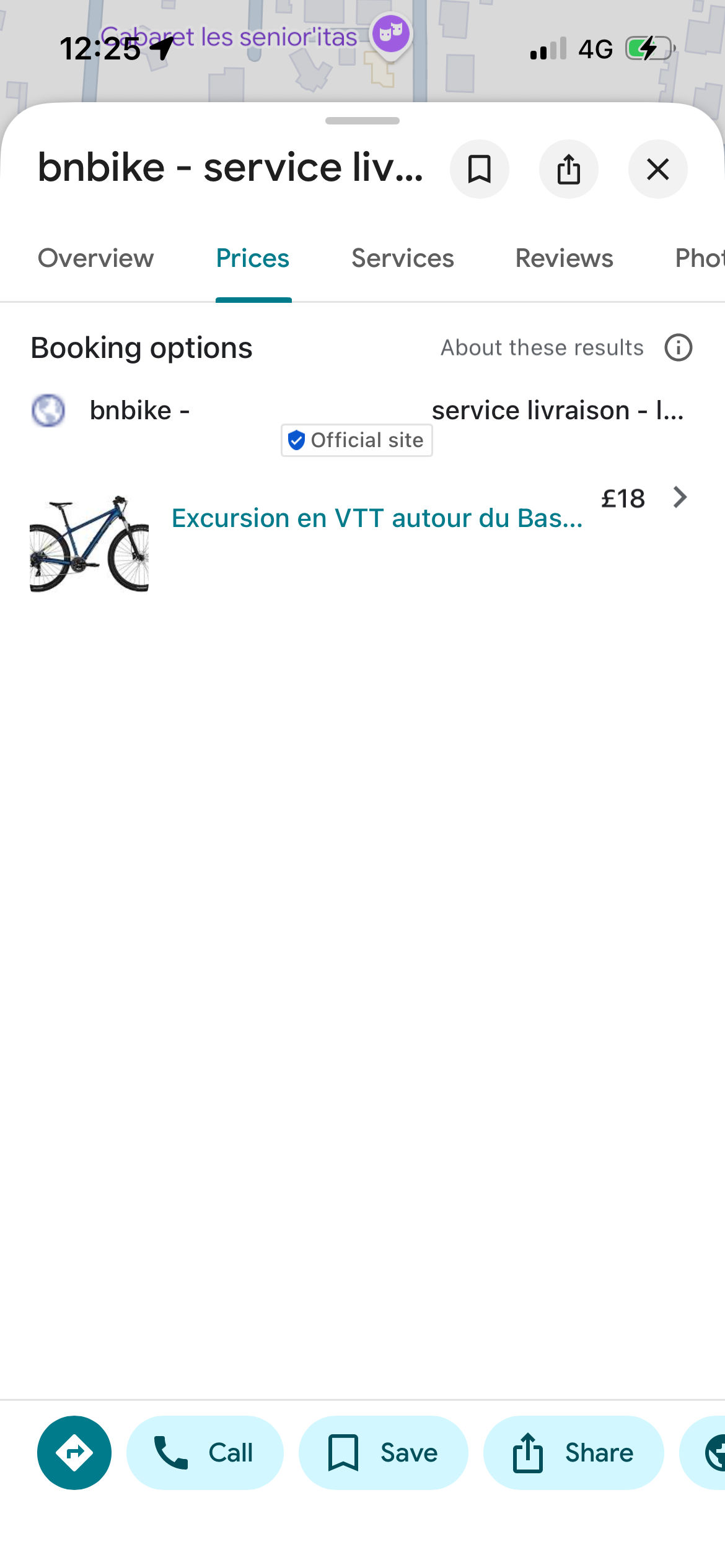
A local business listing its price of a bike rental on it's Google Maps listing. This stops friction where a user has to go from the Google Maps platform to the website where you may end up losing them.
Fill out the attributes section as cearly and consicely as possible
Fill in as many attributes that apply as possible. People use Google Maps extensively and will research a place before going. This could be for elderly or disabled people wanting to know if there is wheelchair access at a restaurant or a hotel or if a cafe or a bar has WIFI access so someone can work there through the day. These may not seem important but they are.
Is it dog friendly, LGBTQ+ friendly. Are there vegetarian/vegan options on offer. Does the establishment serve alcohol.
Be as upfront and honest with people as much as possible when filling out your profile.
This will save you a lot of hassle, for example, if someone in a wheelchair visits and realises they have to climb up a set of stairs to get to your establishment, then that may save you a bad review if you let them know upfront. It will also save you time from people calling up or emailing you to ask you the same questions.
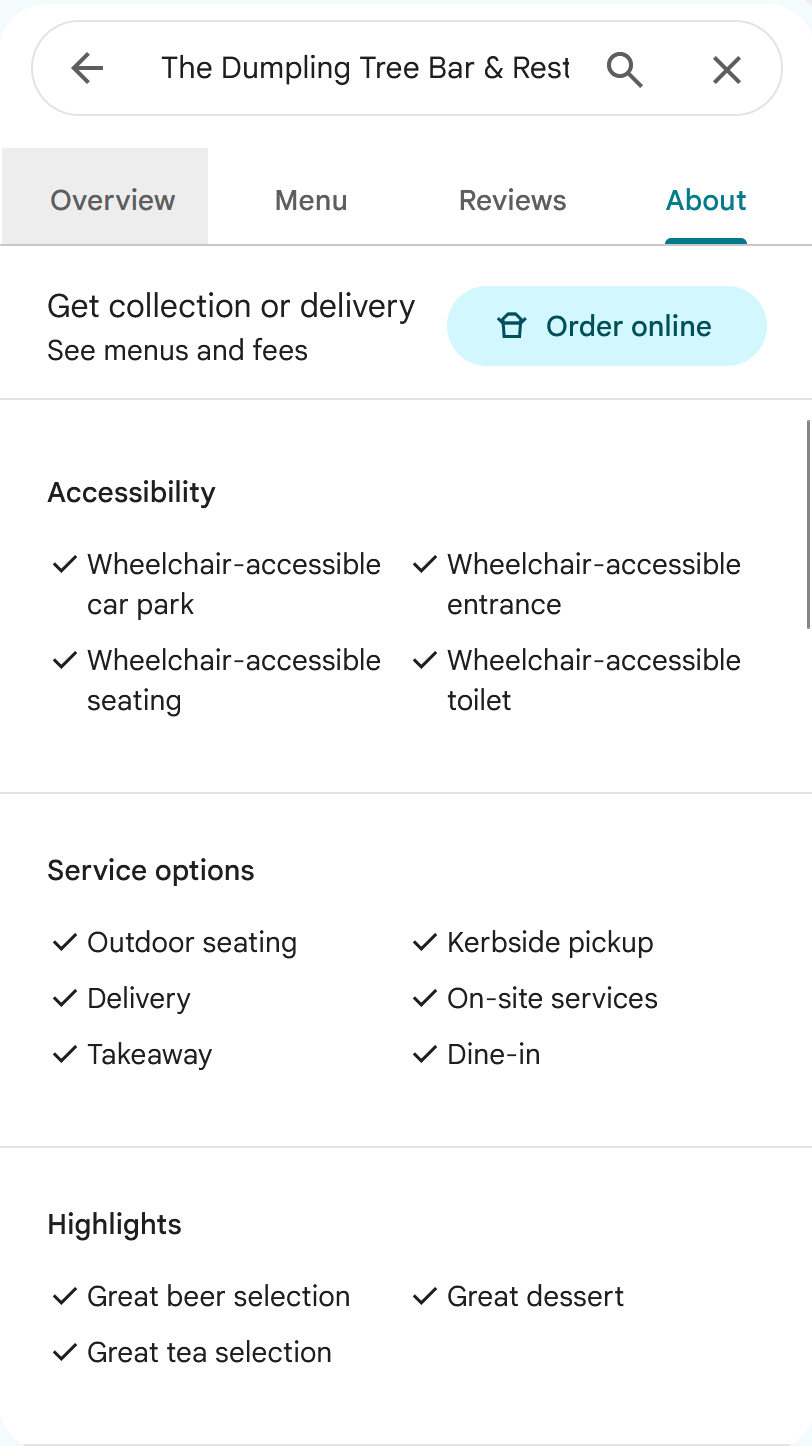
By keeping a comprehsive set of data, it helps users and AI agents understand if your business is the right match for them.
Add videos to your listing
You can also upload videos to your Google Maps account. People tend to think of it as a photo only platform which is just not true. Why not use the opportunity to add high quality videos of your establishment depending on what you do and sell. A video showing your staff or a meal being delivered could be a clincher. There is no limit to how many videos you can upload so the more the better. Just make sure they are shot well.
Reviews
Getting good reviews on Google Maps is vital to how well you perform. Poor reviews can directly impact your business. The following tips advise on how to gain positive reviews and how to respond to any negative ones.
Try to ask for as comprehensive reviews as possible
You don't need convincing that good reviews matter, but detail is increasingly important. AI can now extract sentiment, pull out relevant snippets when someone asks a question about your business, and, almost certainly, the algorithm rewards reviews that show genuine effort. Encourage customers to be specific.
Try to get as comprehensive reviews as possible. That means, not just a rating, but a description too and a lengthy one where the customer describes the experience in full. Also ask them to include photos as this shows true authenticity and helps proves that it is not just a fake review as they have photo evidence to support it.
It also helps if the customer leaving the review is a regular user of Google Maps and has left other reviews. If they have never left a review in their life, this could signal a fake review.
Google has a guides system that ranges from guide expert level 1 through to guide level 10. The more experienced the reviewer, the better.
I don't have any evidence for the above as these will be Google's own internal algorithms that the public doesn't have access to, but the logic and common sense thinking certainly pushes towards it. As a user when you leave a review, you the more comprehensive your review, the more digital "points" you get added to your profile making you more of a prolific reviewer.
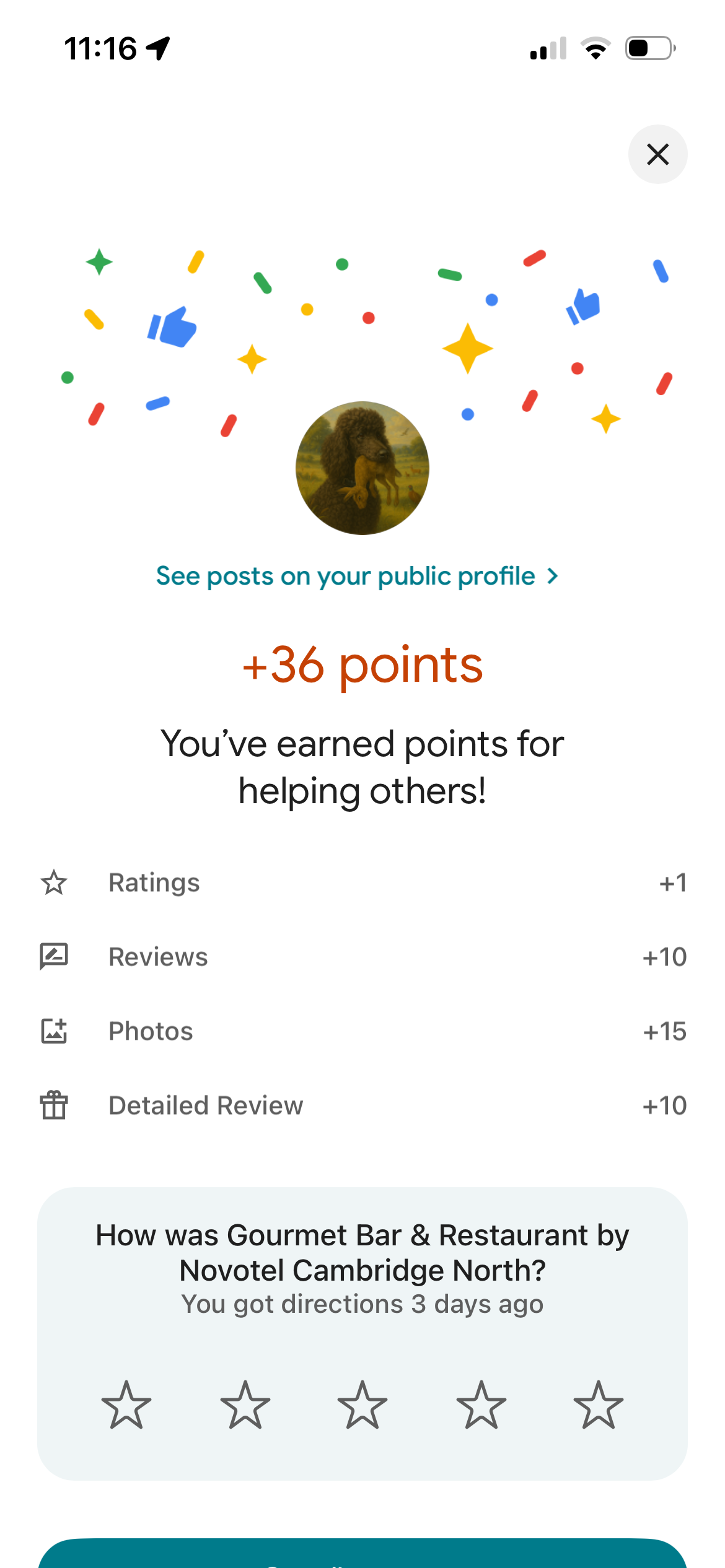
As a user of Google Maps, you are given more internet "points" when you leave a more detailed and comprehensive review rather than just a star rating.
Ask for reviews at the right moment
Think of how apps ask "enjoying this?" — if yes, they take you to the App Store. If no, they take you to a feedback form. Same logic applies here. Don't ask unhappy customers. Do ask your regulars, your loyal clients, the ones who've been coming for years. Reviews — both volume and sentiment — almost certainly correlate directly with how well you rank on Google Maps.
I've seen shops at checkout display an actual physical widget that people can scan the QR code with and it takes them to the correct place to leave a review. This is a picture I took in France. Though it's a different language, you get the idea of how it can work.
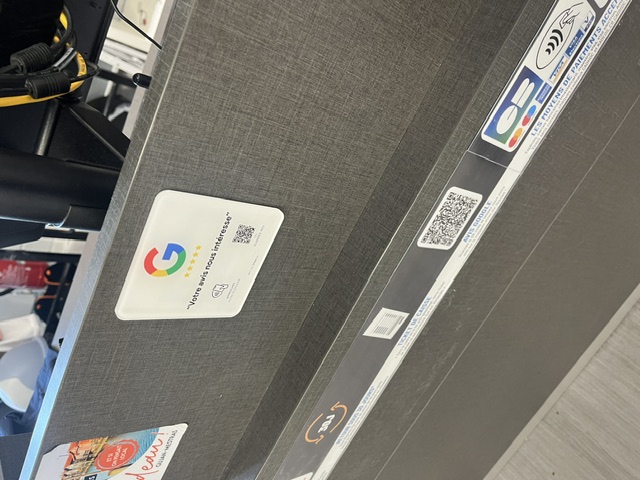
While checking out at a store in France, a phsyical Google widget appears for me to scan the QR code with my phone and leave a positive review. If you see the customer is clearly happy with their purchase, you can direct them to this widget.
Respond to positive reviews
Replying to reviews signals to Google that you're active and engaged. It also shows potential customers you care. Simple as that.
Respond to negative reviews
Keep it professional, keep it brief. Acknowledge the experience, apologise where appropriate, and offer to take it offline — a phone number or email address goes a long way. Never argue back. Even if the reviewer is completely wrong, a defensive or aggressive reply reflects worse on you than the original review. Anyone reading it will judge how you respond more than what was said about you.
Share your review link with customers
Send your Google review link directly via email, text, or WhatsApp shortly after a positive job or visit, while the experience is still fresh. The less effort it takes someone to leave a review, the more likely they actually do it.
To get your link: go to your Google Business Profile, select "Read Reviews" then "Get more reviews", and copy the link shown. Send the link straight to your customer through whichever channel suits the moment — a text after a callout, a WhatsApp message after a sitting, an email after a delivery.
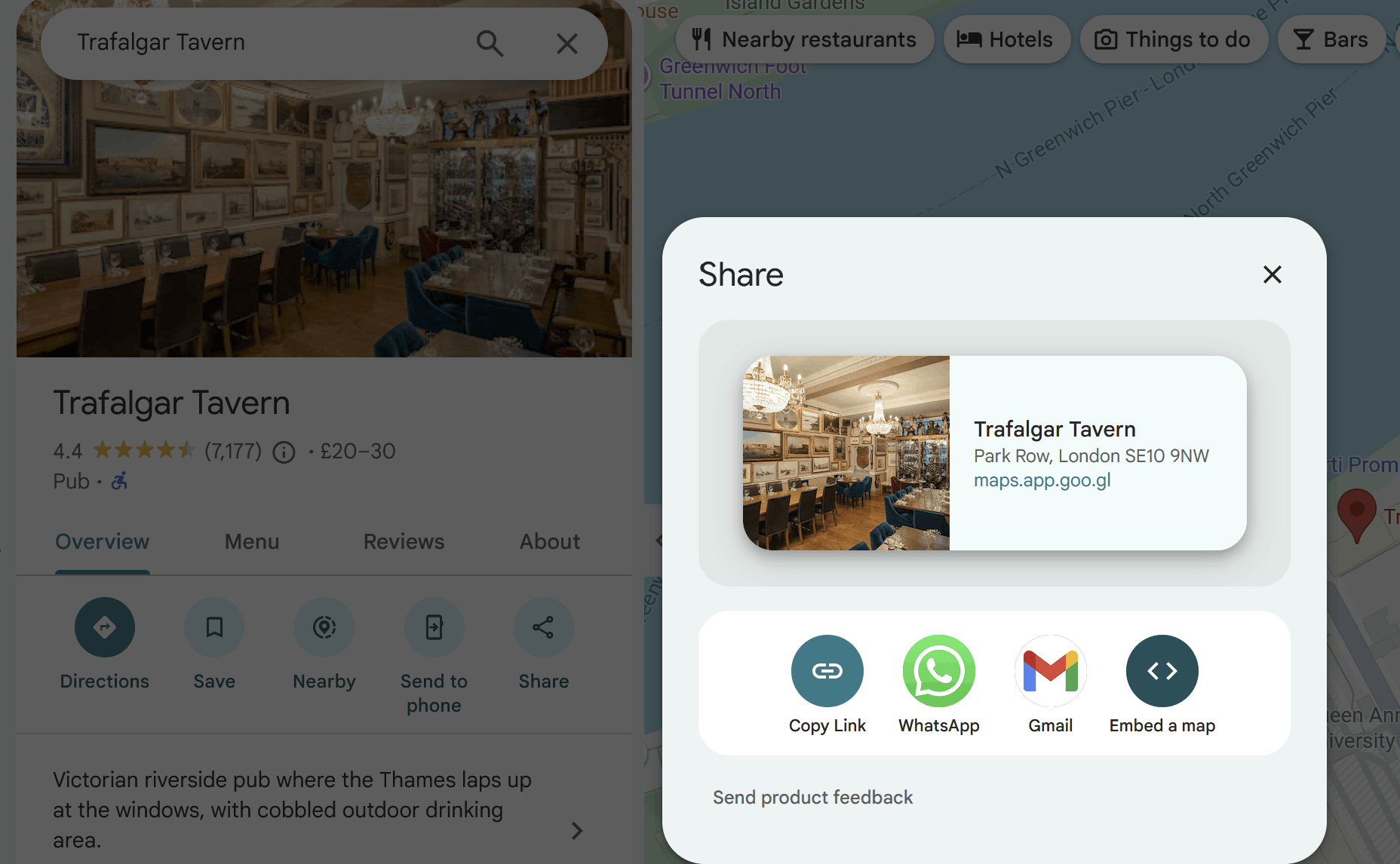
Each Google Maps listing has a share button. From here you can grab a link and ask friends, followers and fans to review you.
The quality of your reviews matters as much as the quantity
Not all reviews carry the same weight. A one-line "great service" does far less for you than a review with detail, multiple photos of the experience, and some context behind it e.g. what they ordered, what stood out, why they'd come back. AI-driven search can read and interpret that kind of review properly, pulling out specifics that match what someone else is searching for.
Reviews with photos, length, and an authoritative-sounding reviewer (someone with a genuine, active Google profile with a history of leaving reviews rather than a blank one) tend to carry more weight in how prominently your business surfaces. A rising tide lifts all boats — the better your reviews collectively are, the more your whole listing benefits, not just the review itself.
You can't write these for people, but you can nudge them. When you ask a happy customer for a review, ask them to mention what they had or what they came in for. A small prompt like that is often the difference between a throwaway line and a review that actually works for you.
Review the feedback you recieve and take action where the negative criticism is fair
A negative review can actually be a blessing in disguise. It's tough to swallow when you recieve one, but if its fair in it's complaint and if you accept the criticism, why not act on improving it? If people are complaining about long wait times or other things, then these reviews can be a great way to collect honest feedback and improve the service.
So use your Google Maps profile as a feedback mechanism to imrpove for the better. You might end up recieving feedback that people are too shy or not direct enough to give in person.
Those first reviews are the hardest to get so ask friends and family
Your first reviews are some of the hardest to get, and some of the most important. Without reviews, it's hard for people to trust you. But without trust, it's hard to get reviews. It's a real chicken-and-egg problem.
Whatever you do, don't try to cheat the system. Google is very good at spotting fake or manipulated reviews, and getting caught can lead to reviews being removed or your profile being penalised.
Instead, start with the people who've genuinely used your business, including friends and family who've been real customers. Ask everyone, not just the people you think will be positive, and make it easy with a direct link to your review page. Your job is to make sure their experience is a great one, so the reviews take care of themselves.
Old reviews won’t keep you on Google Maps: Always be chasing new reviews for recency
Having hundreds of reviews used to give a business a lasting advantage on Google Maps. Not any more. How recent your reviews are is becoming more and more important, and a pile of reviews from years ago carries far less weight than a steady flow of new ones. That means a newer competitor with fewer but fresher reviews can overtake you. Don’t assume your review count will protect you. Keep asking happy customers for reviews every week, even if you already have plenty. If your newest review is months old, start asking again today.
Don't fake reviews; AI systems are becoming more advanced at detecting them and it will hurt you in the long run
Buying reviews or posting fake ones might seem like a quick way up Google Maps, but it’s a risky shortcut. Google uses AI to spot fake reviews and removes them, often in large batches. Businesses caught boosting their ratings can be blocked from receiving new reviews and may have a warning shown on their profile telling customers why. In the UK, fake reviews are also illegal under consumer protection law. Losing your reviews, your ranking and your customers’ trust in one go isn’t worth it. Earn reviews by asking genuine customers instead.
Don't incentivise customers with rewards to leave positive reviews
It's tempting to offer a discount or free coffee in return for a review, but don't. Google is now asking customers directly whether they were offered a reward, and incentivised reviews break its rules on both Maps and your website's star ratings. Don't set staff targets for reviews either, and don't ask customers to mention staff by name. Just ask happy customers for honest feedback in their own words.
Restaurant owners
These tips are specific for restaurant owners, bakeries or take away services though as a local business you are welcome to read them as perhaps you can gain more ideas.
Upload images food photos
First of all, this is just a given. Users will love to see what is on offer and what they can eat, however AI can identify dishes from photos with impressive accuracy. A photo of "Moules Frites" on your profile can get you in front of someone searching for exactly that, nearby.
Remember that Google Maps is also dominated by user generated content and users also tend to upload their own photos, sometimes unglamourous photos. Think of a half-eaten cheese burger that someone has snapped, so you want to upload images of meals freshly prepared just before being eaten.
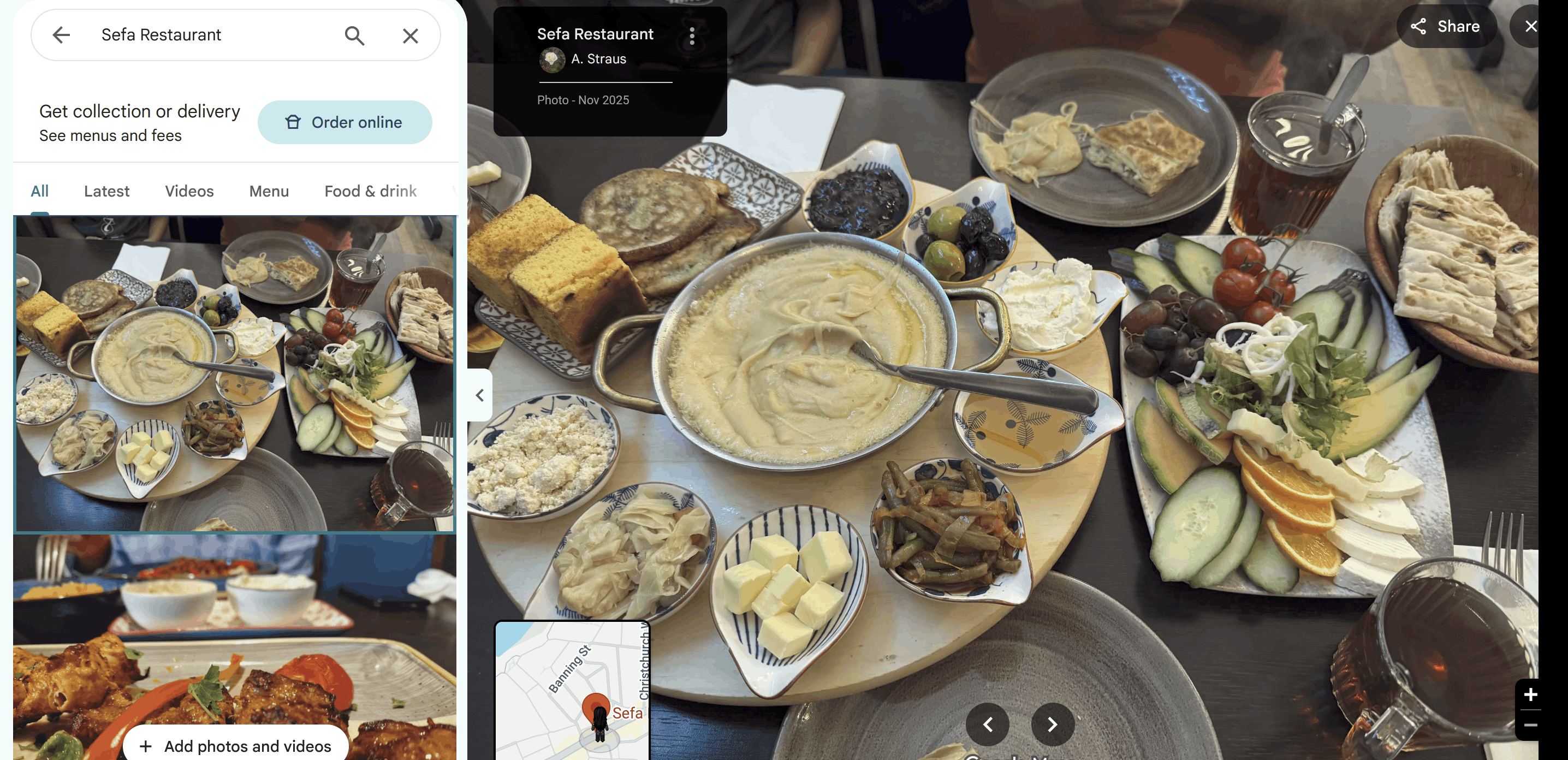
Sefa Restaurant, a Turkish restaurant uploads high quality photos of its food so customers can preview what they are getting if they decide to go. You want your images to be clear and show off as much as possible.
Upload menu photos, dish photos, and a full digital menu
Photos of your actual dishes let people see exactly what they're getting before they order — and AI can now read food photos with real accuracy, so a clear shot of your steak or seafood platter can help you show up when someone searches for that specific dish nearby. Make sure they're good quality, well-lit, no blurry phone snaps in dim lighting.
Do the same with your menu itself. Upload clear, readable photos of it, and if you're in a tourist area, add versions in other languages too — useful for visitors and another way to widen your reach.
Beyond photos, fill in the actual menu section on your profile properly, organised by category, with real prices and descriptions. This is the data Google and AI tools read most reliably, so a complete, well-structured menu does more for your visibility than photos alone.
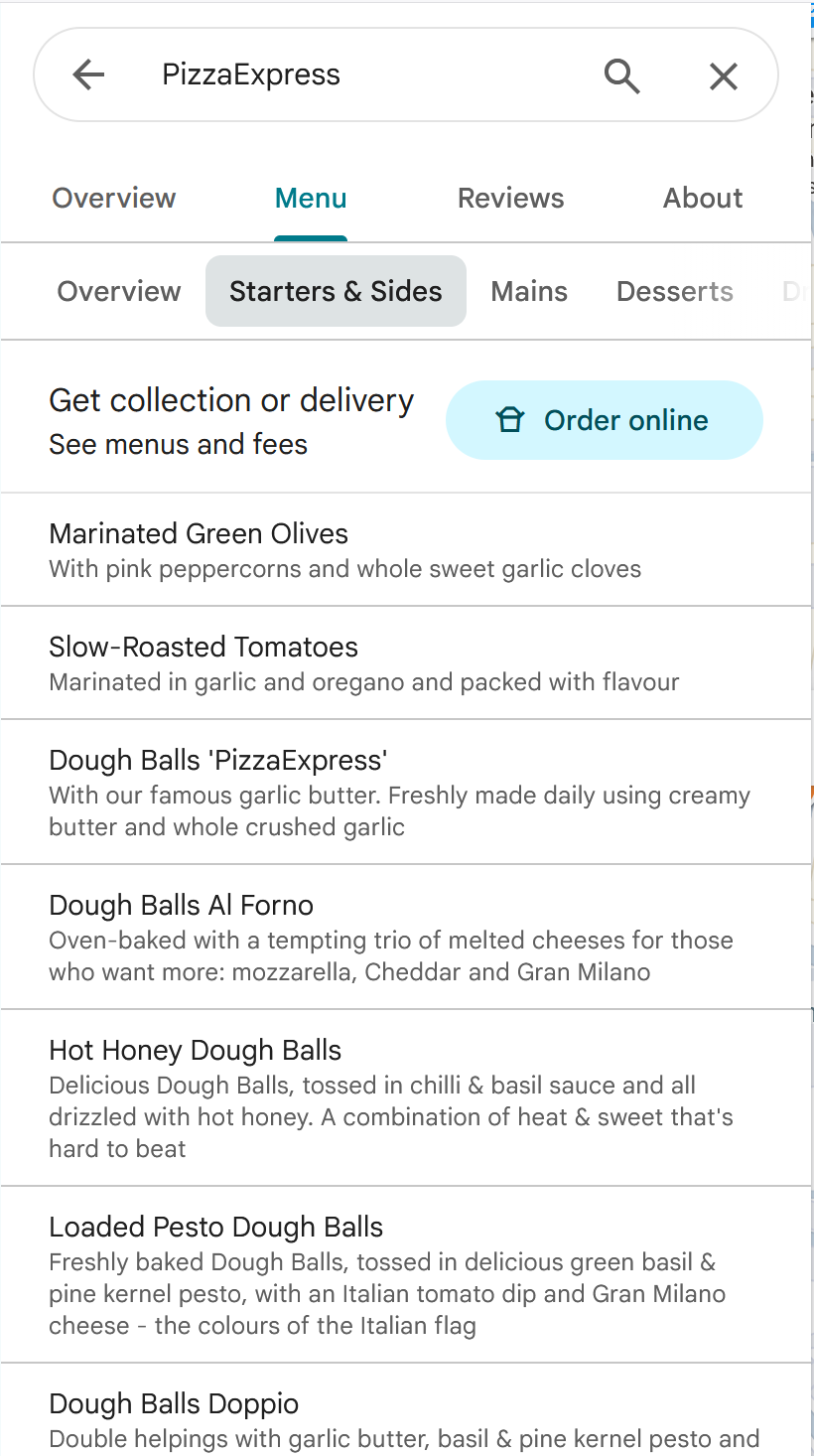
Pizza Express, a popular UK Pizza restaurant has uploaded a full catalogue of food served including dividing by relevent sections, starters, desserts etc.
Add online ordering to your Google Map's profile if you offer it
If you take delivery or takeaway orders online, make sure that's set up properly on your Google Business Profile. Google lets you link an ordering provider directly to your listing, so customers see an "Order online" button right there before they've even opened your website. It also places a memory in the customer's mind that if they want to order online in the future, then it is possible.
It removes a step between someone searching for food nearby and actually placing an order. The shorter that journey, the more orders you convert. If you're using a delivery platform or have your own ordering system, check your profile settings and get this connected. It's a quick win that's easy to overlook.
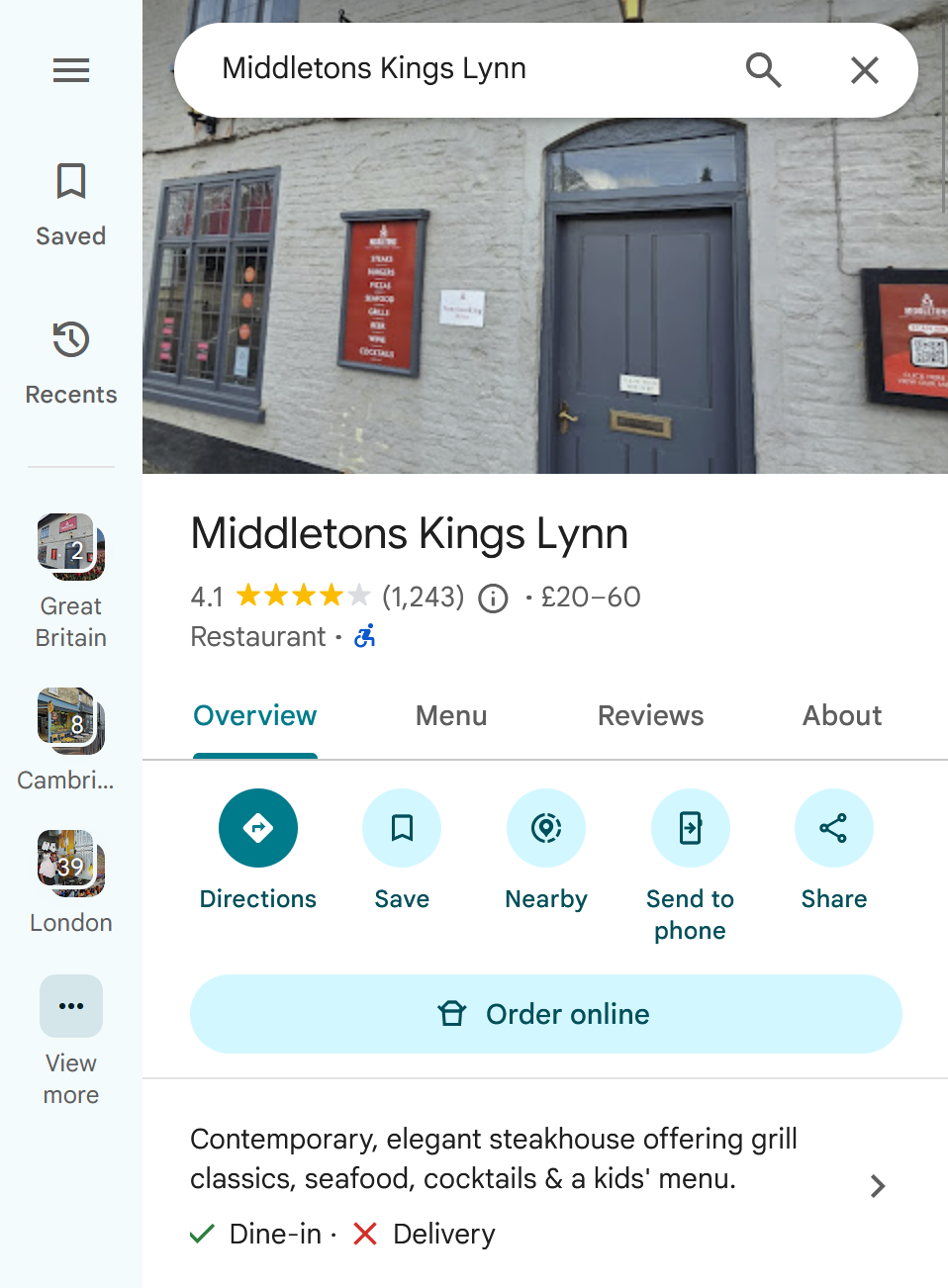
An order online button can help create more custom that you may have missed out on.
Add a "Book a table" button to your Google Maps listing
When a hungry customer finds you on Google Maps, every extra step (ringing you, visiting your website, checking whether you're open) gives them a chance to go somewhere else. A "Book a table" button turns that moment into a booking, and a booking is about as close to a guaranteed sale as a restaurant gets. Booking systems such as OpenTable, ResDiary, SevenRooms and TheFork connect to Google, so diners can see your live availability and book without leaving Search or Maps. If your system doesn't connect, you can still paste your booking link into your Google Business Profile.
The benefits go beyond the booking itself. Most systems show where each booking came from, so you can finally see how much business Google Maps brings in. On busy nights like Valentine's, Mother's Day or Christmas, you know who's coming before the doors open, and you can plan staff, stock and sittings around them. Every booking also gives you the customer's email, which you can use for reminders and, if they've agreed to marketing, for inviting them back. Most systems take less than an hour to connect, so it's well worth doing.
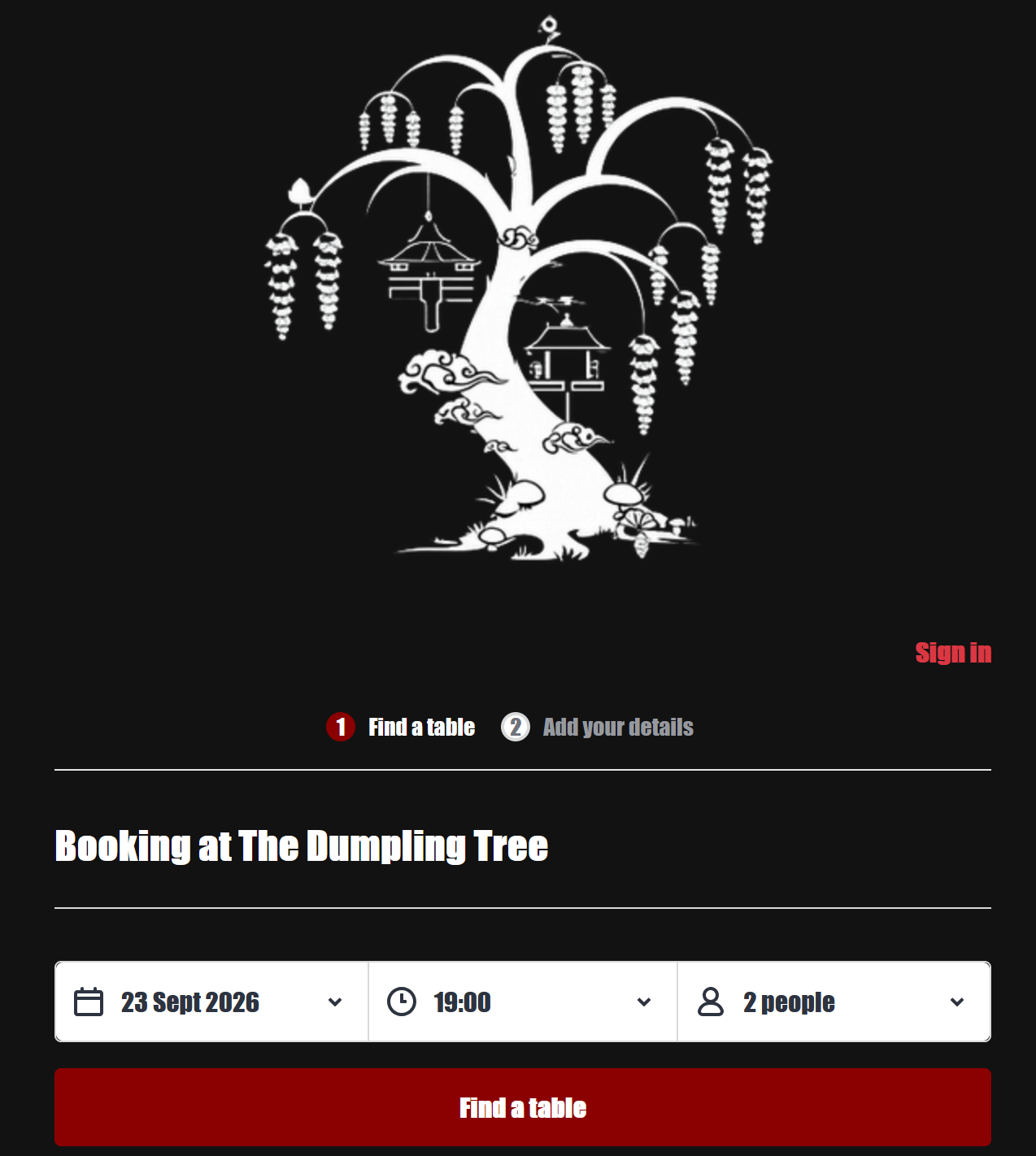
An example of a local restaurant in Cambridge, UK, using Opentable to manage its bookings.
Upload an image of every single menu item your restaurant makes
It sounds like a lot of work, and well, actually is. People often search for a menu item when using Google Maps. For example, they will search for Fish & Chips when in London, or BBQ ribs in Louisiana. Now your restaurant name isn't likely Fish & Chips nor is it BBQ ribs (I could be wrong!) so the searches won't bring up your restaurant. But by uploading a clear photo of every dish you serve, it feeds into the database that you offer this item so when people make a search for Fish and Chips in London, your establishment comes up.
And don't knock yourself out by preparing every dish for the purpose of this task. Take a professional photo as a unique order comes in for a genuine customer and take advantage of it.
Additional options
These tips aren't specific to the Google Maps marketing platform but I believe by doing them, it can help increase your business profile presense overall.
Earn local backlinks and citations
A backlink is another website linking to yours. A citation is your business name, address, and phone number appearing online, with or without a link. Both act as votes of confidence — when relevant local sites mention you, Google reads it as evidence you're a genuine, established business, which strengthens your standing in local search and the Maps pack.
You don't need a big budget or a spammy outreach campaign to build these. Join your local chamber of commerce or trade association, most include a member directory with a link. Sponsor a school fete, sports team, or local event, these often come with a natural mention. Get listed on directories relevant to your trade. Reach out to local press or community blogs about what you're doing. Ask suppliers or partners to include you in their client list.
The common thread is genuine local involvement. Avoid mass directory submissions or paid link schemes, Google spots low-quality links easily and they tend to do more harm than good.
Activate your presense on other map tools and local directories
Apple Maps and Bing Maps are the obvious ones — don't ignore them just because Google dominates. Beyond that, Yelp still carries real weight, particularly for restaurants, bars, and consumer-facing businesses. Facebook has its own business listings and map search that gets used more than people think. If you're a tradesperson, get on Checkatrade or Rated People. Hotel or accommodation? TripAdvisor is non-negotiable. The principle is the same across all of them — consistent name, address, phone number, and ideally photos and reviews. The more places you appear with accurate information, the more signals search engines pick up that you're a legitimate, active business.
Post regular updates on your Google Business Profile
Don't just set your listing up and leave it. Use the Posts feature for time-relevant updates such as a special offer running this week, a closure for maintenance, extended hours over a bank holiday, anything customers would actually want to know. It keeps your profile looking active, which Google's algorithms tend to favour over a listing that hasn't been touched in months.
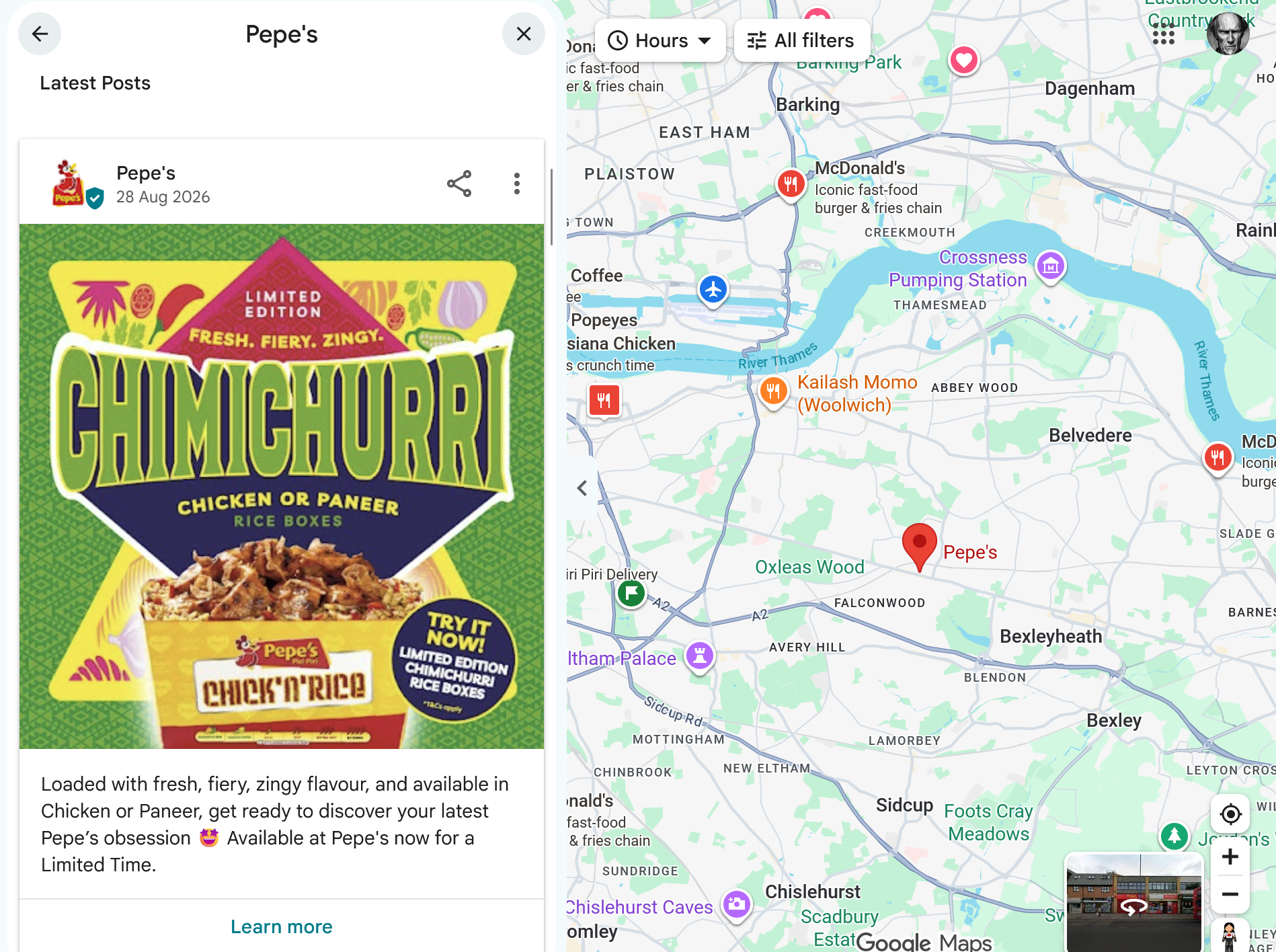
Pepes, a national chain selling peri-peri chicken in the UK posts updates including seasonal posts letting students starting unviersity about special deals or when a new item hits the menu. This can gain new business.
Create sponsored listings on Google Maps
Sponsored Google Map listings are a quite way to promote your brand and get ahead of your competitors. I often see these and they are marked by a square pin. Google will display these first together with your brand name when users are browsing.
It's also likely that they will come in in Google search map packs when people are using the search engine to make a search.
You obviously need to line all your ducks in order before doing this so make sure your organic strategy is working well before investing in paid.
Frequently asked questions about Google Maps marketing
Do you charge for Google Maps marketing on a fixed-project, hourly or monthly retainer basis?
I don't charge by the hour. My Google Maps marketing services come in two fixed-price options: a one-off audit for £500, or a monthly retainer at £1,500 per month.
The audit is a fixed project with a clear end result, so you know the full cost up front. The retainer is a monthly fee for ongoing, hands-on work. If you're not sure which suits you, get in touch and I'll recommend one.
How much time and resources will you need from our team during the research phase?
Very little. Before I start, I'll send you a briefing form with questions about your business, the areas you serve, your Google Business Profile and your main local competitors. Once you've filled that in, I'll take care of the research and only come back to you if I need access to something or have a question.
How long will it take to see results from Google Maps marketing?
How long is a piece of string? It depends on the campaign, and it can take anywhere from a few days to several months. Some changes, such as fixing your Business Profile categories or adding missing services, can make a difference within days. Others, such as building up reviews and climbing the map pack in competitive areas, take months.
Once I've reviewed your Business Profile and local competition, I'll give you a realistic timeline for your situation.
What's the difference between the Google Maps marketing audit and the monthly retainer?
With the audit, I'll present you with an audit document full of recommendations, which you or your team can then put into action.
The audit covers:
- Google Business Profile audit
- Map pack ranking check for your key searches
- Competitor profile comparison
- Category, services and attributes review
With the retainer, I'm hands-on. I'll help with the day-to-day management of your Google Maps marketing and we'll have regular check-ins to review progress.
On top of everything in the audit, the retainer includes:
- Weekly Google Posts written and published
- Photo uploads and profile updates
- Review request strategy and replies
- Monthly local ranking grid report
Matthew Boyle
Digital Marketing Consultant · ~20 years experience
Matthew Boyle has over 20 years experience in digital marketing covering a wide range of topic areas. He is available for a one-off consultation or ongoing support.
View my LinkedIn profile