Technical SEO
 Matthew BoyleLast updated: 8 October 2026
Tips and tricks around technical SEO
Who we are

Matthew Boyle
Matthew Boyle is a seasoned professional having helped multiple websites fix crawling, indexing and speed issues that held back their rankings. He has deep technical SEO experience.
View Matthew Boyle's LinkedIn profileWhat it costs to hire a technical SEO expert or agency
The cost of a Technical SEO expert who provides consultancy and agency services can depend on the scope of the project and what exactly is needed. Below we have listed the prices we charge for the service. If you wish to have more information then contact us.
| What's included | One-off audit£500 | Monthly service£1,500per month |
|---|---|---|
| Full site crawl and error report | ✓ Included | ✓ Included |
| Core Web Vitals and page speed review | ✓ Included | ✓ Included |
| Indexing, robots.txt and sitemap check | ✓ Included | ✓ Included |
| Prioritised fix list for your developer | ✓ Included | ✓ Included |
| Schema markup implementation | ✗ Not included | ✓ Included |
| Fixes implemented or managed with your dev team | ✗ Not included | ✓ Included |
| Ongoing crawl monitoring and alerts | ✗ Not included | ✓ Included |
| Monthly technical health report | ✗ Not included | ✓ Included |
A practical guide to technical SEO, tip by tip
Hire a technical SEO marketing consultant or expert
If you'd rather have someone handle this for you, Matthew Boyle has worked on technical SEO with a range of business owners and can advise on growing leads, traffic, and sales through your Google Maps presence. One project was a site with a billion pages and a failed migration which he fixed. Get in touch to find out how he can help.
Check your robots.txt file
Robots.txt is a file that sits on your website and tells search engine crawlers which pages they can and cannot access. Get it wrong and you can accidentally block Google from crawling your entire site and wonder why your rankings have disappeared.
It is more common than you think. A developer makes a change, a website migration goes slightly wrong, someone copies a staging site configuration to live. Suddenly your robots.txt is telling Google and other search engines to go away and it quietly obliges.
To check yours, type your domain into a browser followed by /robots.txt — for example yourwebsite.com/robots.txt. If you see a line that reads Disallow: / under User-agent: * your whole site is blocked. That is bad. Google also has a free Robots.txt Tester inside Google Search Console. It lets you test individual URLs against your current rules and see exactly what crawlers can and cannot access. Worth checking, especially if you have recently moved platforms, redesigned your site, or had any developer work done.
Want it broken down for you? Try ELI5 my robots.txt — paste yours in and get a plain-English, line-by-line explanation of exactly what it's telling search engines and AI bots.
ELI5 my robots.txt
Upload or paste your robots.txt and get a plain-English explanation of what it’s telling search engines and AI bots. It all happens in your browser.
Create a favicon
A favicon is the small icon that appears in a browser tab next to your page title. It sounds minor but it's a trust signal — a site without one looks unfinished. It also appears in bookmarks and on mobile when someone saves your site to their home screen.
Most website builders will have a favicon upload option in their settings. You need a square image, ideally 512x512 pixels, saved as a PNG. If you don't have a logo, even a single letter or simple icon works fine. There are free tools like favicon.io that will generate one for you in seconds and give you the right file formats.
Compress any images before publishing them
Make sure your images are an optimised reasonable file size, the right dimensions for where they're used, and proper alt text for accessibility.
Huge, unoptimised images slow your page down badly, and page speed is something Google factors into ranking. Slow-loading pages also mean visitors leave before they've even seen what you offer.
You don't need anything technical to fix this. There are free online tools (like TinyPNG or Squoosh) that compress images in seconds with barely any visible quality loss, or most website builders have a built-in compression option you can switch on. Either way, check your images aren't several megabytes each — it's one of the easiest wins available.
Compressing the image keeps the image normal to the human eye but reduces the size for machines loading the image saving time and space.
Structure your pages with proper heading tags
Think of a heading hierarchy like a book. H1 is the title, H2s are chapters, H3s are sections within those chapters. That structure helps a human skim a page, and it does the same job for crawlers.
Search engines and AI bots aren't reading your page the way a person does, they're parsing the document structure to understand what matters and how it's organised. One H1 per page that states what it's about. H2s for your main sections. H3s for anything nested under those. Skip levels or use headings for styling rather than structure, and you make it harder for a robot to make sense of the page, even if it looks fine to a person.
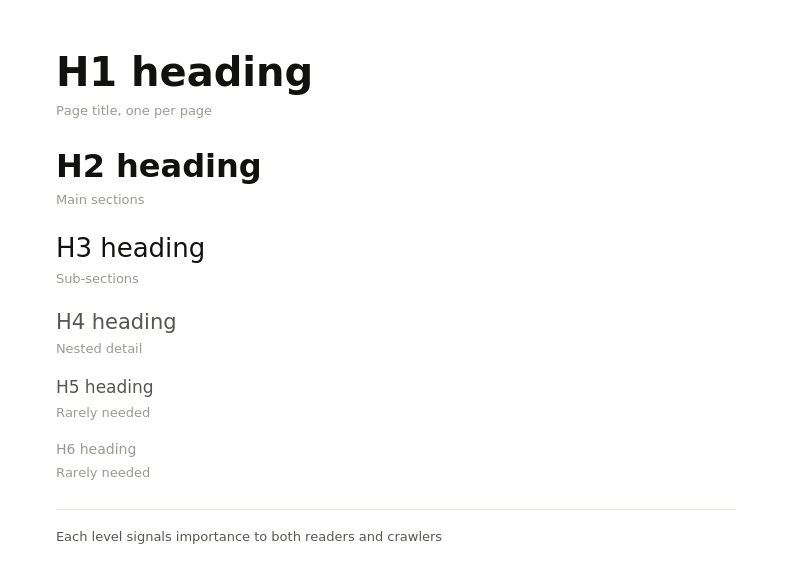
A document that has been properly structured with correct heading tags from H1>H6 helps search engines understand the context of a webpage.
Use Google Search Console's URL inspection tool to see how Google visually sees your page
Google Search Console lets you inspect any URL on your site and see how Google actually renders it — the page as Googlebot sees it, not as you see it in your browser. Bear in mind there are thousands of different devices, screen sizes, and resolutions out there, and the way your page looks on your laptop is not how everyone else sees it, and not how Google sees it either.
If the rendered version looks broken, missing content, or nothing like the real page, something is wrong. JavaScript not rendering, content blocked by robots.txt, or a crawl error — the inspection tool will surface it. If something looks visually off, treat it as a problem that needs investigating. It's one of the most useful diagnostics available and it's free.
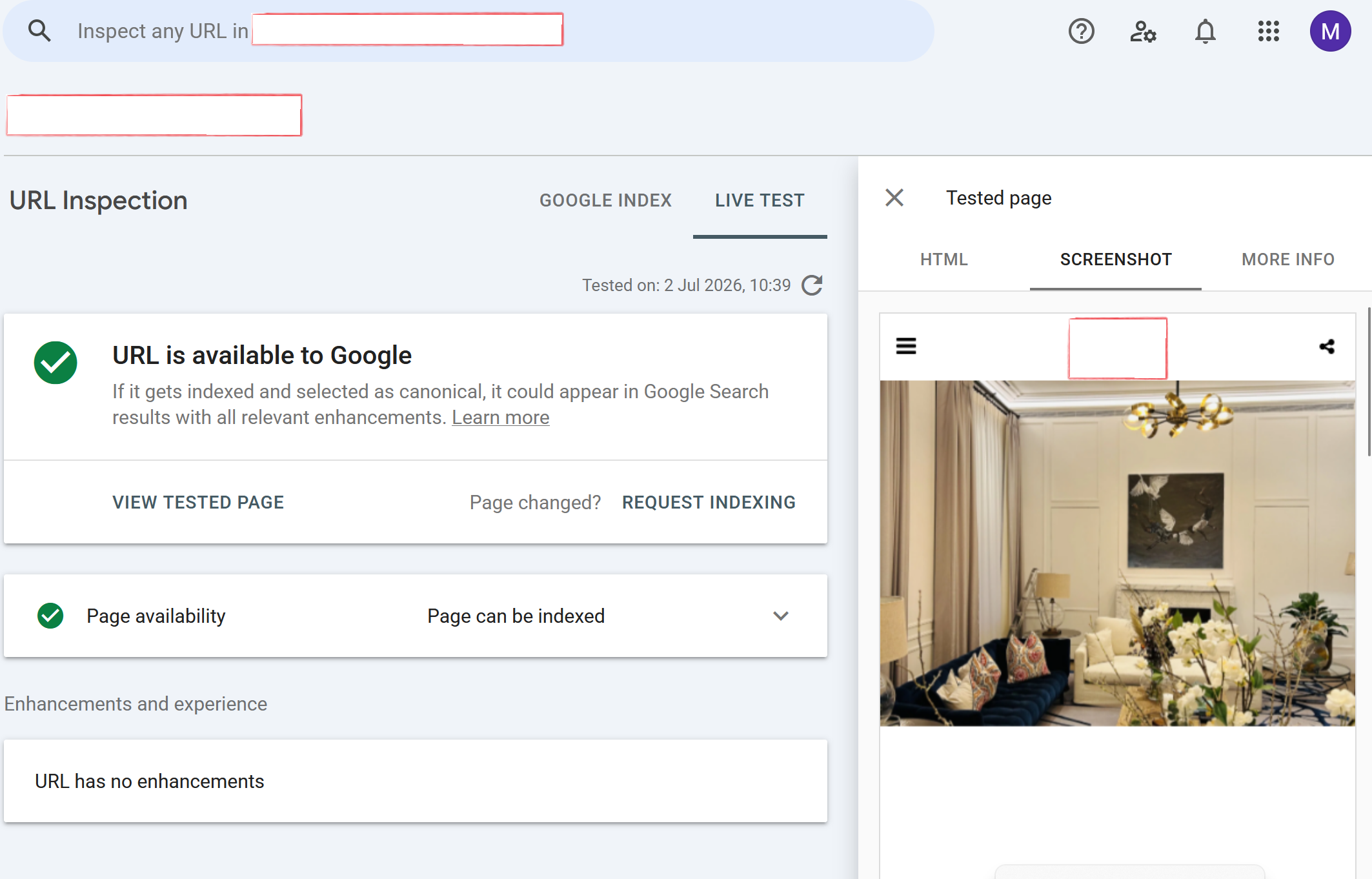
While you may be able to view your page correctly, Google and other crawlers will use a different set of browser tools. By using the visual inspect tool, you can see exactly how Google sees your site.
Check that your FAQ sections that are hidden in accordions on your website aren't invisible to search and AI crawlers
What It Is FAQ accordions are interactive web elements that expand to reveal answers when a user clicks on a question. They allow pages to store a dense amount of structured information in a clean, compact layout.
However, many websites build these accordions using dynamic JavaScript that loads the text into the Document Object Model (DOM) only after an interactive click event occurs. Without that user interaction, the text does not exist in the rendered page code.
Why It Matters Search engine crawlers and LLM scrapers generally browse pages in a static state—they do not trigger click events or interact with collapsed elements as a human user would.
If your FAQ content requires a click to physically load into the code, search engines and AI models will treat that content as invisible. This means valuable long-tail keywords, direct answer targets, and rich context won't be indexed or used to train AI models on your brand.
And a really key important part, the type of quesiton you include in your FAQs are by definition freuqntly asked questions and are going to be the EXACT same type when prompted by the user in their LLM tool. It can be some of your most important helpful content and its hidden.
How to Check and Fix You can audit your website's FAQ components in under a minute using Chrome DevTools:
Open a page on your site with collapsed FAQs using Google Chrome.
Click to open one of the questions and copy a unique phrase from inside the answer.
Right-click anywhere on the page and select Inspect to open DevTools.
Select the Elements tab, press Ctrl + F (or Cmd + F on Mac), paste the text, and press Enter to confirm the text string appears in the source code.
Reload the page while keeping DevTools open, without clicking or interacting with the page.
Search for the exact same text string in the Elements tab again.
If the text string is missing on your second search, the component is only injecting text on a click event. To correct this, the hidden content should be rendered directly into the HTML upon initial page load, using standard CSS properties (like display: none or visibility: hidden) to handle the visual expand/collapse behavior.
Stay plugged into the technical SEO community
Google keeps changing how it crawls, renders and indexes websites. A technical setup that was fine two years ago could now be holding your site back.
The Art of SEO by Eric Enge, Stephen Spencer and Jessie Stricchiola is a comprehensive reference that covers the technical side in depth. Google's Search Off the Record podcast gives you behind-the-scenes insight from Google's own Search team, including episodes on crawlers and page size limits. On Reddit, r/TechSEO is the go-to community for the technical side of SEO.
Stay switched on, or you risk fixing problems the old way.
Multilingual SEO
Tips for ranking for multiple languages.
Set up hreflang tags
If you run multiple versions of the same page in different languages, hreflang tells Google which version to show to which audience. Without it, Google might serve the wrong language to the wrong visitor, or worse, see your pages as duplicate content competing against each other.
Each version needs to point to itself and to every other language variant, so search engines understand the full set of alternatives. Get it wrong and you can end up with the wrong page ranking in the wrong country, or pages cannibalising each other instead of working together. Most CMS platforms and SEO plugins can handle this for you, it's just often skipped entirely.
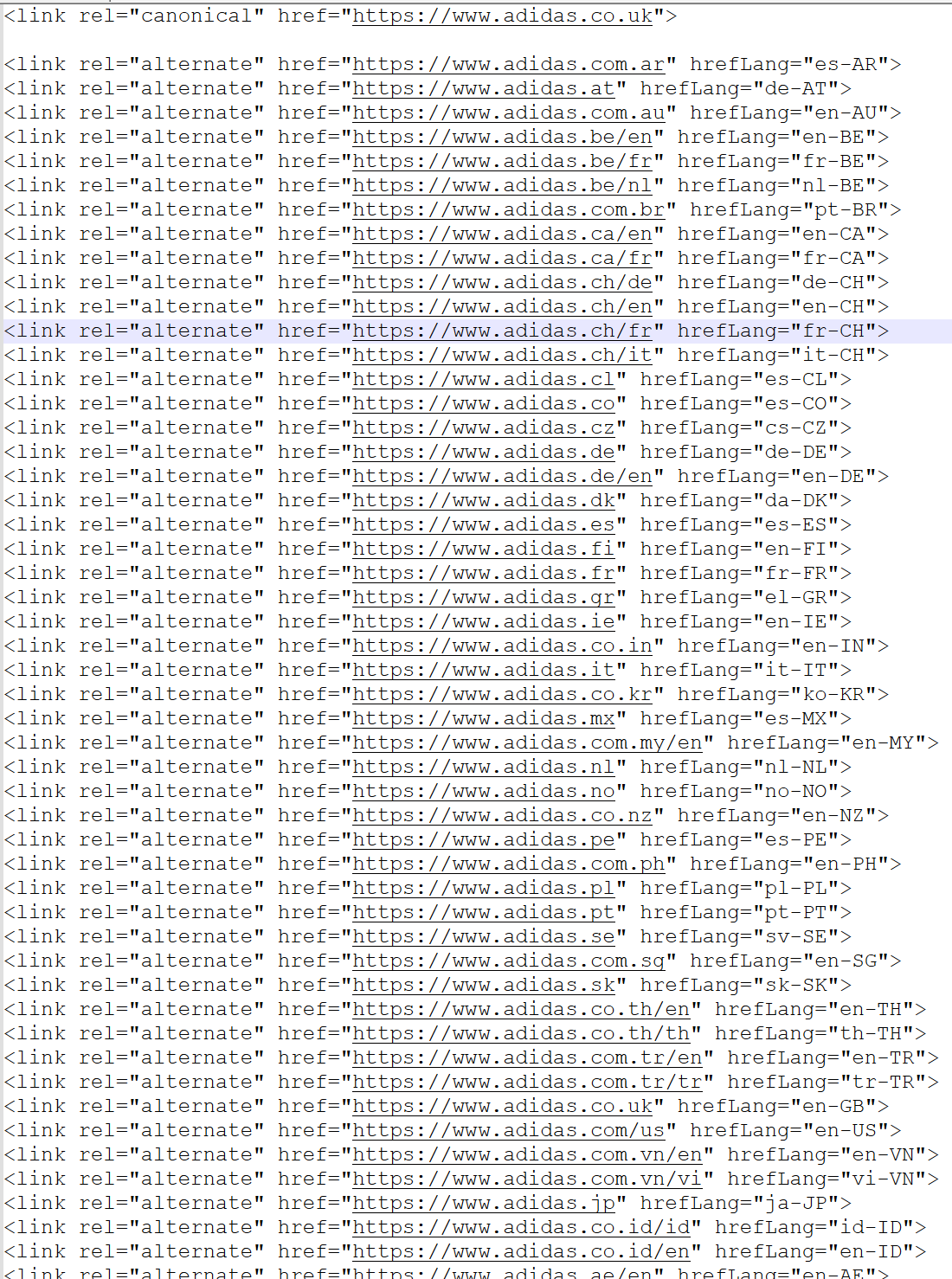
Correctly implemented hreflang tags can direct search engines and AI crawlers to find a foreign language equilvent of the URL it has landed on. These must be setup correctly or you risk penalising your site.
Crawalability
Having efficient crawlability allows search engines and AI crawlers to better analyse your site and understand which sections are more important than others.
Create a sitemap and submit it to relevant tools
A sitemap is a file that lists every page on your website and tells search engines where to find them. Without one, Google is relying entirely on following links to discover your pages — which means anything that isn't well linked internally could get missed entirely.
Most website builders generate a sitemap automatically. If you're on WordPress, a plugin like Yoast handles it. You just have to active it.
If you've built something custom, there are free online tools that will crawl your site and generate one for you. Once you have it, submit it directly in Google Search Console under the Sitemaps section — this tells Google exactly where it is and prompts a crawl. Bing and other services will have its own sections.
If you are vibe-coding, you can ask your AI Agent to create a sitemap for you itself.
Check it periodically. If you add new pages and they're not appearing in the sitemap, Google may not know they exist and something is wrong with your sitemap.
Check your crawl logs
Search engine crawlers don't have unlimited time or resources to spend on your site. They operate within what's known as a crawl budget — a rough limit on how many pages they'll crawl in a given visit. If that budget is being spent on pages you don't care about, such as filtered URLs, duplicate pages, or old parameters, then pages that actually matter may not be getting crawled at all.
Crawl logs are the raw record of every request a crawler made to your server — which pages it visited, when, and how often. Analysing them tells you whether Google is spending its time in the right places. You might find it's hammering a faceted navigation page nobody needs indexed, while ignoring a key service page you actually want to rank.
If you work in soley in an SEO or marketing department you may have to request these from the team that manages the servers. There are also tools like Screaming Frog, JetOctopus, and Cloudflare's that can help you pull and analyse this data.
Once you can see the pattern, you can start fixing it — blocking low-value pages via robots.txt, improving internal linking to priority pages, or cleaning up URL structures that are generating unnecessary crawlable variants.
Frequently asked questions about technical SEO
Do you charge for technical SEO on a fixed-project, hourly or monthly retainer basis?
I don't charge by the hour. My technical SEO services come in two fixed-price options: a one-off audit for £500, or a monthly retainer at £1,500 per month.
The audit is a fixed project with a clear end result, so you know the full cost up front. The retainer is a monthly fee for ongoing, hands-on work. If you're not sure which suits you, get in touch and I'll recommend one.
How much time and resources will you need from our team during the research phase?
Very little. Before I start, I'll send you a briefing form with questions about your website, the platform it's built on, who makes changes to it and any known issues. Once you've filled that in, I'll take care of the research and only come back to you if I need access to something or have a question.
How long will it take to see results from technical SEO?
How long is a piece of string? It depends on the campaign, and it can take anywhere from a few days to several months. Some changes, such as fixing a robots.txt block or a broken redirect, can make a difference within days. Others, such as site-wide speed improvements and getting large sections of a site re-crawled and re-indexed, take months.
Once I've reviewed your site crawl, I'll give you a realistic timeline for your situation.
What's the difference between the technical SEO audit and the monthly retainer?
With the audit, I'll present you with an audit document full of recommendations, which you or your team can then put into action.
The audit covers:
- Full site crawl and error report
- Core Web Vitals and page speed review
- Indexing, robots.txt and sitemap check
- Prioritised fix list for your developer
With the retainer, I'm hands-on. I'll help with the day-to-day management of your technical SEO and we'll have regular check-ins to review progress.
On top of everything in the audit, the retainer includes:
- Schema markup implementation
- Fixes implemented or managed with your dev team
- Ongoing crawl monitoring and alerts
- Monthly technical health report
Matthew Boyle
Digital Marketing Consultant · ~20 years experience
Matthew Boyle has over 20 years experience in digital marketing covering a wide range of topic areas. He is available for a one-off consultation or ongoing support.
View my LinkedIn profile